Python 基本構文の一覧・文法チートシート
print・変数・データ型・演算子・条件分岐・ループ・コレクション・内包表記・関数・クラス・例外処理まで、Pythonの文法を17章で一気に見渡せるようにまとめました。冒頭の早見表で書き方と実行結果を結論から示し、「やりたいこと」から引けるチートシート、予約語の一覧、文法エラーの直し方の表も載せています。
「Pythonの文法をひととおり見渡したい」「書き方を忘れたときにすぐ引きたい」——このページはその2つを1ページで済ませるために作りました。上から通しで読めば文法の全体像がつかめ、あとから戻ってきたときはチートシートだけを見れば書き方を思い出せます。
コード例は手元の環境(Windows 11・Python 3.12.10)で実行し、画面に出力がある箇所は # => の形で実際の結果を併記しています。Python 3.10 以降であれば同じ結果になります(バージョンごとの注意は早見表のコードの直後にまとめています)。
Python基本文法の一覧・早見表(結論)
よく使う13の書き方を、1行のコードと実行結果の組にまとめました。実行結果は、左の書き方を Python 3.12.10 で実行して表示された値です。
| 構文(やりたいこと) | 1行例(コード) | 実行結果 | 詳しく |
|---|---|---|---|
| 画面に表示する(print) | print("Hello, Python!") | Hello, Python! | 1章 |
| 変数に値を入れる | x = 10 の後に print(x * 2) | 20 | 2章 |
| 文字列に変数を埋め込む(f-string) | name = "花子" の後に print(f"{name}さん") | 花子さん | 4章 |
| 条件で分ける(if / elif / else) | score = 75 を if score >= 80: → elif score >= 60: → else: の順に判定し、A・B・C を表示 | B | 5章 |
| 決まった回数繰り返す(for+range) | for i in range(3): の中で print(i) | 0 1 2(1行ずつ) | 6章 |
| 条件の間繰り返す(while) | n = 1 から while n < 100: の中で n *= 2、抜けた後に print(n) | 128 | 6章 |
| リストに追加する | nums = [3, 1, 2] に nums.append(5) | [3, 1, 2, 5] | 7章 |
| 辞書から値を取り出す | user = {"name": "花子", "age": 20} の後に print(user["name"]) | 花子 | 9章 |
| 関数を作って呼ぶ(def) | def add(a, b): return a + b の後に print(add(3, 5)) | 8 | 12章 |
| クラスを作って使う(class) | print(Dog("ポチ").bark())(Dog クラスは下のコード) | ポチ: ワン | 13章 |
| モジュールを読み込む(import) | import math の後に print(math.sqrt(16)) | 4.0 | 14章 |
| エラーを捕まえる(try / except) | try: の中で int("abc")、except ValueError: でメッセージを表示 | 数値ではありません | 15章 |
| リストを1行で作る(内包表記) | print([k * k for k in range(5)]) | [0, 1, 4, 9, 16] | 11章 |
表の13行は、次の1本のスクリプトとしてまとめて実行しています。quick.py などの名前で保存して python quick.py と実行すると、# => の右に書いた結果が上から順に表示されます。
# 画面に表示する
print("Hello, Python!")        # => Hello, Python!

# 変数に値を入れる
x = 10
print(x * 2)                   # => 20

# 文字列に変数を埋め込む(f-string)
name = "花子"
print(f"{name}さん")            # => 花子さん

# 条件で分ける
score = 75
if score >= 80:
    print("A")
elif score >= 60:
    print("B")                 # => B
else:
    print("C")

# 決まった回数繰り返す
for i in range(3):
    print(i)                   # => 0 / 1 / 2(1行ずつ)

# 条件の間繰り返す
n = 1
while n < 100:
    n *= 2
print(n)                       # => 128

# リストに追加する
nums = [3, 1, 2]
nums.append(5)
print(nums)                    # => [3, 1, 2, 5]

# 辞書から値を取り出す
user = {"name": "花子", "age": 20}
print(user["name"])            # => 花子

# 関数を作って呼ぶ
def add(a, b):
    return a + b

print(add(3, 5))               # => 8

# クラスを作って使う
class Dog:
    def __init__(self, name):
        self.name = name

    def bark(self):
        return f"{self.name}: ワン"

print(Dog("ポチ").bark())       # => ポチ: ワン

# モジュールを読み込む
import math
print(math.sqrt(16))           # => 4.0

# エラーを捕まえる
try:
    int("abc")
except ValueError:
    print("数値ではありません")  # => 数値ではありません

# リストを1行で作る(内包表記)
print([k * k for k in range(5)])   # => [0, 1, 4, 9, 16]
※ 辞書の結合演算子 | は3.9、match 文は3.10で追加された構文で、それより古い環境では動きません。予約語の節の type 文は3.12以降の構文です。17.6・17.7 のように書き方の対比を示すスニペットと、13.2・13.3・14.3 のように前の例の続きとして書いたコードは、単体では動きません。文法エラーの節のエラー文は3.12.10の表示です(文言はバージョンによって変わることがあります)。
ここにない書き方は、やりたいこと別のチートシート83項目で探せます。日付・時刻の扱いは書式指定が多いため、日付フォーマット早見表(datetime・strftime)に分けてまとめています。表の書き方を実際に使ってみたい方は、レベル別の練習アプリ・お題集から1つ選ぶと、どの構文をどこで使うかがつかめます。
全17章を順に読む必要はありません。まず 1. print とインデント → 2. 変数 → 5. 条件分岐 → 6. ループ → 7. リスト の5章だけで、簡単なプログラムはひととおり書けるようになります。内包表記やクラスは、必要になってから戻ってくれば十分です。
まだPythonを動かす環境がない方はインストール手順から。エラーが出て止まってしまったらよくあるエラー解決を、構文を覚えたあとは初心者向けアプリ89本で手を動かすと定着しやすくなります。
- ✅ Python基本文法の一覧・早見表(結論)
- 🔖 基本構文チートシート(やりたいこと別・83項目)
- 🔑 Pythonの予約語(キーワード)一覧:35個+ソフトキーワード4個(3.15 は5個)
- 🔀 他の言語との違い:Pythonの文法の特徴
- 1. 最初の約束事(print・入力・コメント・インデント)
- 2. 変数とデータ型
- 3. 演算子
- 4. 文字列操作と f-string
- 5. 条件分岐(if / elif / else)
- 6. ループ(for / while)
- 7. リスト(list)
- 8. タプル(tuple)
- 9. 辞書(dict)
- 10. 集合(set)
- list・tuple・dict・set の違い早見表
- 11. 内包表記
- 12. 関数(def)の基本
- 13. クラス(class)の基本
- 14. モジュールの import
- 15. 例外処理(try / except)
- 16. ファイル操作
- 17. 実践ヒント・よくある落とし穴
- 🩹 文法ミスで出るエラーと直し方(早見表)
- よくある質問(FAQ)
基本構文チートシート(やりたいこと別・83項目)
「やりたいこと」が決まっているのに書き方が出てこない、という場面のためのチートシートです。分類ごとに詳しい解説へのリンクを付けているので、ここで書き方を思い出し、迷ったら該当の章へ飛ぶという使い方ができます。ブックマークして、書きながら参照してください。
画面で引くだけでなく手元に1冊置いて体系的に学びたい方は、Python入門書のおすすめ2冊(当サイトの参考書ランキング総合1〜2位)から最初の1冊を選ぶと、このチートシートの各項目を順番に理解しながら進められます。
出力・入力・コメント → 1章で詳しく
| やりたいこと | 書き方 | ひとこと |
|---|---|---|
| 画面に表示する | print(値) | 最初に覚える出力の基本 |
| 複数の値を並べて表示する | print(a, b) | 半角スペースで区切られる |
| 区切り文字を変える | print(a, b, sep="-") | カンマ区切りの出力にも使える |
| 末尾で改行しない | print(値, end="") | 1行に続けて出したいとき |
| キーボードから入力を受け取る | input("名前: ") | 返る値は必ず文字列 |
| 入力を数値として使う | int(input()) | 変換しないと計算できない |
| コメント(メモ)を書く | # メモ | 行末まで実行されない |
変数・データ型 → 2章で詳しく
| やりたいこと | 書き方 | ひとこと |
|---|---|---|
| 変数に値を入れる | x = 10 | 型の宣言は不要 |
| 複数の変数へ同時に代入する | x, y = 1, 2 | タプルの分解を利用している |
| 2つの値を入れ替える | a, b = b, a | 一時変数がいらない |
| 型を調べる | type(値) | デバッグの第一歩 |
| 型が合っているか確かめる | isinstance(x, int) | 継承関係も考慮される |
| 文字列を整数に変換する | int("42") | 数字以外だと ValueError |
| 数値を文字列に変換する | str(42) | 文字列と連結する前に必要 |
| 小数に変換する | float("3.14") | 金額計算は誤差に注意 |
| 「値が無い」ことを表す | None | 判定は is None で |
演算子 → 3章で詳しく
| やりたいこと | 書き方 | ひとこと |
|---|---|---|
| 四則演算をする | + - * / | / の結果は必ず小数 |
| 割り算の商を整数で得る | 7 // 2 | 結果は 3(切り捨て) |
| 余りを求める | 7 % 2 | 結果は 1。偶数判定にも使う |
| べき乗を計算する | 2 ** 10 | 結果は 1024 |
| 値が等しいか調べる | a == b | 比べるのは「値」 |
| 同じオブジェクトか調べる | a is b | 基本は None の判定にだけ使う |
| 条件を組み合わせる | and / or / not | 括弧で優先順位を明示すると安全 |
| 含まれているか調べる | "a" in items | 文字列・リスト・辞書に使える |
| 変数の値を更新する | n += 1 | -= *= なども同様 |
文字列 → 4章で詳しく
| やりたいこと | 書き方 | ひとこと |
|---|---|---|
| 文字数を数える | len(s) | リストの要素数にも使える |
| 変数を文字列に埋め込む | f"{name}さん" | f-string。現在の標準 |
| 小数点以下の桁をそろえる | f"{x:.2f}" | 金額表示の定番 |
| 3桁区切りで表示する | f"{n:,}" | 1000000 → 1,000,000 |
| 大文字・小文字にする | s.upper() / s.lower() | 元の文字列は変わらない |
| 前後の空白・改行を取り除く | s.strip() | 入力値の整形に必須級 |
| 区切って分割する | s.split(",") | 返るのはリスト |
| リストを1つの文字列にする | ",".join(items) | 要素はすべて文字列である必要がある |
| 一部を置き換える | s.replace("a", "b") | 該当箇所をすべて置換 |
| 一部を取り出す(スライス) | s[0:5] | 末尾から取るなら s[-3:] |
条件分岐 → 5章で詳しく
| やりたいこと | 書き方 | ひとこと |
|---|---|---|
| 条件で処理を分ける | if 条件: | 次の行は4スペース字下げ |
| 別の条件を追加する | elif 条件: | いくつでも並べられる |
| どれにも当てはまらない場合 | else: | 省略してもよい |
| 1行で書き分ける | "A" if 条件 else "B" | 三項演算子 |
| 値のパターンで分ける | match / case | Python 3.10以降で利用可 |
ループ → 6章で詳しく
| やりたいこと | 書き方 | ひとこと |
|---|---|---|
| 決まった回数繰り返す | for i in range(5): | 0から4まで |
| リストの中身を順に取り出す | for x in items: | インデックス指定は不要 |
| 連番つきで取り出す | for i, x in enumerate(items): | 「何番目か」も欲しいとき |
| 2つのリストを同時に回す | for a, b in zip(A, B): | 短いほうに合わせて終わる |
| 条件が成り立つ間繰り返す | while 条件: | 更新を忘れると無限ループ |
| ループを途中で抜ける | break | そのループだけを抜ける |
| 次の回へ飛ばす | continue | 残りの処理をスキップ |
| 逆順に回す | for x in reversed(items): | 元のリストは変わらない |
| 辞書のキーと値を回す | for k, v in d.items(): | 2つ同時に受け取れる |
リスト・タプル → 7・8章で詳しく
| やりたいこと | 書き方 | ひとこと |
|---|---|---|
| リストを作る | nums = [1, 2, 3] | 空なら [] |
| 末尾に追加する | nums.append(4) | 1つずつ追加 |
| 位置を指定して挿入する | nums.insert(0, 9) | 先頭は 0 |
| 値を指定して削除する | nums.remove(9) | 最初に見つかった1つだけ |
| 取り出しながら削除する | nums.pop() | 引数なしで末尾 |
| 並べ替える | nums.sort() / sorted(nums) | 前者は元を書き換える |
| 逆順のリストを得る | nums[::-1] | 新しいリストが返る |
| 合計・最大・最小を求める | sum() max() min() | 数値のリストに使う |
| 安全にコピーする | nums.copy() | = はコピーにならない |
| 変更しない組を作る | point = (3, 4) | タプル。要素1つなら (3,) |
辞書・集合 → 9・10章で詳しく
| やりたいこと | 書き方 | ひとこと |
|---|---|---|
| 辞書を作る | d = {"a": 1} | キーと値の組 |
| 値を取り出す | d["a"] | キーが無いと KeyError |
| 無いときの既定値つきで取り出す | d.get("b", 0) | KeyError を避けられる |
| 追加・更新する | d["b"] = 2 | 同じ書き方でどちらも行う |
| 削除する | del d["a"] | d.pop("a", None) なら安全 |
| キーがあるか調べる | "a" in d | 調べるのはキー側 |
| 重複を取り除く | set(items) | 順序は保証されない |
| 2つの集合の共通要素を得る | setA & setB | 和は |、差は - |
関数・クラス・import → 12〜14章で詳しく
| やりたいこと | 書き方 | ひとこと |
|---|---|---|
| 関数を定義する | def 名前(引数): | 中身は字下げして書く |
| 結果を返す | return 値 | 無い場合は None が返る |
| 既定値つきの引数にする | def f(x=0): | 可変オブジェクトは書かない |
| 引数を何個でも受け取る | def f(*args): | キーワードは **kwargs |
| クラスを定義する | class 名前: | 先頭は大文字が慣例 |
| 初期化処理を書く | def __init__(self, ...): | インスタンス作成時に呼ばれる |
| 標準ライブラリを読み込む | import math | インストール不要 |
| 必要な部分だけ読み込む | from datetime import date | そのまま date と書ける |
| 別名をつけて読み込む | import pandas as pd | 慣習の別名に従うと読みやすい |
例外・ファイル → 15・16章で詳しく
| やりたいこと | 書き方 | ひとこと |
|---|---|---|
| エラーを捕まえて処理を続ける | try: / except エラー名: | 型は具体的に指定する |
| 成功・失敗にかかわらず実行する | finally: | 後片付けに使う |
| 自分でエラーを発生させる | raise ValueError("...") | 不正な入力を弾くとき |
| ファイルを読む | with open(p, encoding="utf-8") as f: | 閉じ忘れを防げる |
| ファイルに書く | open(p, "w", encoding="utf-8") | "a" なら追記 |
| 1行ずつ読む | for line in f: | 大きなファイルでも省メモリ |
| JSONを読み書きする | json.load() / json.dump() | 設定ファイルの定番 |
ここに載せた83項目は、実際にアプリを1本書くときに繰り返し登場する書き方だけを選んでいます。丸暗記は不要です。「あれ、どう書くんだっけ」と思ったらこの表に戻る——これを何度か繰り返すうちに、よく使うものから自然に手が覚えます。標準・外部あわせたライブラリ側の一覧が必要になったらPythonライブラリ一覧を、関数まわりを深掘りしたくなったら関数の使い方と一覧をどうぞ。
Pythonの予約語(キーワード)一覧:35個+ソフトキーワード4個(3.15 は5個)
予約語(キーワード)は、if や for のように Python が文法のために使っている単語です。変数名・関数名・クラス名には使えません。Python 3.12 時点の予約語は35個で、標準ライブラリの keyword モジュールで確認できます(個数はバージョンによって変わります)。
import keyword

print(len(keyword.kwlist))         # => 35
print(keyword.kwlist)
# => ['False', 'None', 'True', 'and', 'as', 'assert', 'async', 'await', 'break', 'class', 'continue', 'def', 'del', 'elif', 'else', 'except', 'finally', 'for', 'from', 'global', 'if', 'import', 'in', 'is', 'lambda', 'nonlocal', 'not', 'or', 'pass', 'raise', 'return', 'try', 'while', 'with', 'yield']
print(keyword.softkwlist)          # => ['_', 'case', 'match', 'type'](3.15 では 'lazy' も入る)
print(keyword.iskeyword("class"))  # => True
print(keyword.iskeyword("print"))  # => False
「命令一覧・コマンド一覧」を探している方へ:予約語と組み込み関数の違い
Pythonに「命令」という正式な区分はありません。文法を組み立てる単語が下の予約語35個で、print や len のように処理を行うのが組み込み関数です。組み込み関数は関数ガイドの組み込み関数一覧(用途別)にまとめています。
予約語35個の用途別一覧
35個を用途ごとに並べ直したのが次の表です。「詳しく」の列は、本ページでその書き方を解説している章です。「範囲外」の語は基本文法の次の段階で使うもので、本ページでは扱っていません。
| 分類 | 予約語 | 用途 | 詳しく |
|---|---|---|---|
| 値 | True | 真(正しい)を表す真偽値 | 2章 |
| 値 | False | 偽(正しくない)を表す真偽値 | 2章 |
| 値 | None | 「値が無い」ことを表す | 2章 |
| 演算 | and | 両方が真なら真 | 3章 |
| 演算 | or | どちらかが真なら真 | 3章 |
| 演算 | not | 真と偽を反対にする | 3章 |
| 演算 | in | 含まれているかを調べる(for で要素を取り出すときにも使う) | 5章 |
| 演算 | is | 同じオブジェクトかを調べる(主に is None) | 17章 |
| 条件分岐 | if | 条件が真のときだけ実行する | 5章 |
| 条件分岐 | elif | 別の条件を追加する | 5章 |
| 条件分岐 | else | どの条件にも当てはまらないときに実行する(for・try にも付けられる) | 5章 |
| ループ | for | 要素を順に取り出して繰り返す | 6章 |
| ループ | while | 条件が真の間繰り返す | 6章 |
| ループ | break | ループを途中で抜ける | 6章 |
| ループ | continue | その回の残りを飛ばして次の回へ進む | 6章 |
| その他 | pass | 何もしない(中身が空のブロックに置く) | 17章の例 |
| その他 | del | 変数やリスト・辞書の要素を削除する | 9章 |
| 関数 | def | 関数を定義する | 12章 |
| 関数 | return | 関数から値を返す | 12章 |
| 関数 | global | 関数の中から外側(モジュール)の変数に代入すると宣言する | 12章 |
| 関数 | nonlocal | 内側の関数から外側の関数の変数に代入すると宣言する | 12章(名前のみ) |
| 関数 | lambda | 名前のない短い関数をその場で作る | 範囲外 |
| 関数 | yield | 値を1つずつ返すジェネレーターを作る | 範囲外 |
| クラス | class | クラスを定義する | 13章 |
| import | import | モジュールを読み込む | 14章 |
| import | from | モジュールの一部だけを読み込む | 14章 |
| import | as | 別名を付ける(import・except・with で使う) | 14章 |
| 例外 | try | エラーが起きるかもしれない処理を囲む | 15章 |
| 例外 | except | 起きたエラーを捕まえて処理する | 15章 |
| 例外 | finally | エラーの有無にかかわらず最後に実行する | 15章 |
| 例外 | raise | エラーを自分で発生させる | 15章 |
| 例外 | assert | 条件が偽なら AssertionError を出す(動作確認用) | 範囲外 |
| 後片付け | with | ファイルを閉じるなどの後片付けを自動で行う | 16章 |
| 非同期 | async | 非同期処理の関数を定義する | 範囲外 |
| 非同期 | await | 非同期処理が終わるのを待つ | 範囲外 |
ソフトキーワード4個(match・case・_・type)と 3.15 の lazy
決まった場面でだけ予約語として働く単語をソフトキーワードと呼びます。Python 3.12〜3.14 では、次の4個です。3.10で追加された match 文で使う match・case・_ と、3.12で加わった type(型に別名を付ける type 文で使う)です。それ以外の場所では、ふつうの名前として使えます。Python 3.15(2026年10月9日リリース)では、import の前に置いて読み込みを遅らせる lazy が加わり、5個になりました(PEP 810・Python 3.15 の公式ドキュメント「字句解析」のソフトキーワードの節)。
# ソフトキーワードは、決まった場面以外では変数名にも使える
match = "変数名として使える"
print(match)            # => 変数名として使える

# Python 3.12 で追加された type 文(型に別名を付ける)
type Point = tuple[float, float]
print(Point.__value__)  # => tuple[float, float]
type 文は Python 3.12 以降でしか動きません。予約語とソフトキーワードの一覧は、Python公式ドキュメント「字句解析」のキーワードの節でも確認できます。
予約語は変数名にできない/print や len は上書きできてしまう
予約語を変数名にすると、プログラムは1行も実行されずに SyntaxError で止まります。
class = 1
# => SyntaxError: invalid syntax
名前として使いたいときは class_ のように末尾に _ を付けるのが、PEP 8 の示す慣習です。
反対に注意が要るのが print や len です。これらは予約語ではなく組み込み関数なので、変数名として代入できてしまいます。代入した時点ではエラーにならず、次に呼び出したところで止まります。
print = 1          # 予約語ではないので代入できてしまう
print("こんにちは")
# => TypeError: 'int' object is not callable
対話モード(REPL)でこうなったときは del print で自分の変数を消すと、組み込みの print に戻ります。list・str・sum なども同じ理由で変数名に使わないほうが安全です。
次に読む:Python 3.15 で増えた構文(lazy import など) — 上で触れた lazy を使う lazy import の書き方(モジュールのトップレベル専用)と、frozendict など 3.15 のほかの新機能をまとめています。
他の言語との違い:Pythonの文法の特徴
C・Java・JavaScript などを先に学んだ方がPythonで最初につまずくのは、中括弧の代わりに字下げでブロックを表す点と、演算子や値の書き方の違いです。よく出る違いを表にまとめました。
| 項目 | C・Java・JavaScript などの書き方 | Pythonの書き方 | 詳しく |
|---|---|---|---|
| 文の区切り | 行末に ;(C・Java では必須) | 改行で区切る(; は不要) | FAQ |
| ブロック | { } で囲む | 行末の : と字下げ(半角スペース4個) | 1章 |
| 変数の宣言 | int x = 10;(C・Java)/let x = 10;(JavaScript) | x = 10(型の宣言は不要・型ヒントは任意) | 2章 |
| コメント | // や /* */ | # | 1章 |
| 論理演算 | && || ! | and or not | 3章 |
| 1増やす | i++ | i += 1(++ は無い) | 3章 |
| 条件の追加 | else if | elif | 5章 |
| 三項演算子 | 条件 ? A : B | A if 条件 else B | 5章 |
| 多分岐 | switch / case | match / case(Python 3.10以降) | 5章 |
| 回数を決めたループ | for (i = 0; i < 5; i++) | for i in range(5): | 6章 |
| 値が無いこと | null(Java・JavaScript)/NULL(C) | None | 2章 |
| 真偽値 | true / false | True / False(先頭が大文字) | 予約語 |
Pythonの文は2種類に分かれます。単純文は、代入・関数の呼び出し・import・return のように1行で完結する文です。複合文は、if・for・while・def・class・try・with のように、行末の : のあとに字下げしたブロックを持つ文です。他の言語で中括弧が担っている役目を、この : と字下げが担います。
表の書き方をPythonで書くと次のようになります。
total = 0
for i in range(5):              # i++ で数える代わりに、range() が 0〜4 を順に渡す
    if i % 2 == 0 and i != 0:   # && の代わりに and
        total += i              # 中括弧の代わりに、字下げでブロックを表す
    elif i == 3:                # else if の代わりに elif
        total -= 1
print(total)                    # 文末のセミコロンは不要
# => 5

i = 0
i += 1          # i++ は書けないので += 1 で増やす
print(i)        # => 1

value = None    # null の代わりに None
print(value is None)   # => True

flag = True     # true / false ではなく先頭大文字の True / False
print(not flag) # => False   !flag の代わりに not

x = 5
label = "正" if x > 0 else "0以下"   # x > 0 ? "正" : "0以下" の代わり
print(label)    # => 正
他の言語の書き方のまま書くと、次のエラーになります(Python 3.12.10 で実行した表示)。
i = 0
i++
# => SyntaxError: invalid syntax

if a:
    pass
else if b:
    pass
# => SyntaxError: expected ':'

x = 1
if (x > 0) {
    print(x)
}
# => SyntaxError: invalid syntax

flag = true
# => NameError: name 'true' is not defined. Did you mean: 'True'?
else if では、else の直後に : が来ていないことが指摘されるため、メッセージが expected ':' になります。true は文法上はただの変数名として読まれるので、SyntaxError ではなく実行時の NameError になります。文末のセミコロンは書いてもエラーにはなりません(x = 1; y = 2; も動きます)。
次に読む:Pythonで作れるもの一覧(目的別マップ) — 画面のある道具・仕事の自動化・データ集計など、やりたいことから当サイトの動く実例へたどれます。
1. 最初の約束事(print・入力・コメント・インデント)
文法の各論に入る前に、Pythonのコードを読み書きするうえで前提になる4つを押さえます。ここを飛ばすと、あとの章のコード例が「なぜそう書くのか」わからなくなります。特にインデント(字下げ)はPython特有の文法で、初学者がエラーで止まりやすい箇所です。
1.1 print() — 画面に出力する
print() は値を画面に表示する組み込み関数です。プログラムが期待どおり動いているかを確かめる、手軽な手段でもあります。
# 「#」から行末まではコメント。Pythonには無視される
print("Hello, Python!")        # => Hello, Python!

# 複数の値はカンマで並べられる(半角スペースで区切られる)
print("合計は", 3 + 4, "です")   # => 合計は 7 です

# 区切り文字を変える
print("a", "b", sep="-")       # => a-b

# 末尾の改行を止める(次の print が同じ行に続く)
print("改行しない", end="")
print("|続き")                  # => 改行しない|続き
1.2 input() — キーボードから受け取る
input() はユーザーの入力を受け取ります。ここで重要なのは、受け取る値が必ず文字列(str)になる点です。数値として計算したいときは int() や float() で変換します。この変換を忘れて TypeError になるのは、初学者が最初に出会うエラーの定番です。
name = input("名前を入力: ")       # 入力を待つ。返り値は文字列
print(f"こんにちは、{name}さん")

age = input("年齢を入力: ")
print(type(age))                  # => <class 'str'>  数字を打っても文字列

age_num = int(age)                # 数値として使うなら変換が必要
print(age_num + 1)                # 1歳後の年齢
input() + 1 と書くと TypeError: can only concatenate str (not "int") to str になります。数値として扱うなら必ず int(input()) のように変換してください。エラー文の読み方はTypeErrorの解説にまとめています。
1.3 コメント — 実行されないメモ
# から行末までは実行されません。処理の意図や、あとで自分が忘れそうな前提を書き残しておく場所です。本ページのコード例でも、実行結果を # => の形でコメントに書いています。
# 行まるごとのコメント
tax_rate = 0.1          # 行の途中からのコメントも書ける

# 複数行にまたがるメモは # を続けて書く
# 税率は 2026年8月時点の想定値。
# 変更があればここを直す。
1.4 インデント — Pythonでは字下げが文法
多くの言語が { } でブロックを表すのに対し、Pythonは行頭の字下げでブロックを表現します。字下げの幅はPEP 8が推奨する半角スペース4個が標準です。
score = 80

if score >= 60:
    print("合格")          # 半角スペース4個で字下げ=ifの中
    print("おめでとう")     # 同じ幅=同じブロック
print("処理終了")           # 字下げなし=ifの外。条件に関係なく実行される
# => 合格
# => おめでとう
# => 処理終了
字下げが必要な場所で字下げしないと、実行前の段階でエラーになります(エラー文の読み方はIndentationErrorの解説にまとめています)。
if score >= 60:
print("合格")
# => IndentationError: expected an indented block after 'if' statement on line 1
見た目が同じでも、タブ文字と半角スペースは別物です。混在すると TabError: inconsistent use of tabs and spaces in indentation になります。Webからコピーしたコードを貼り付けたときに起こりがちなので、エディタで「空白文字を表示」する設定にしておくと原因をすぐ特定できます。エディタ側の設定手順はVSCodeセットアップで解説しています。
2. 変数とデータ型
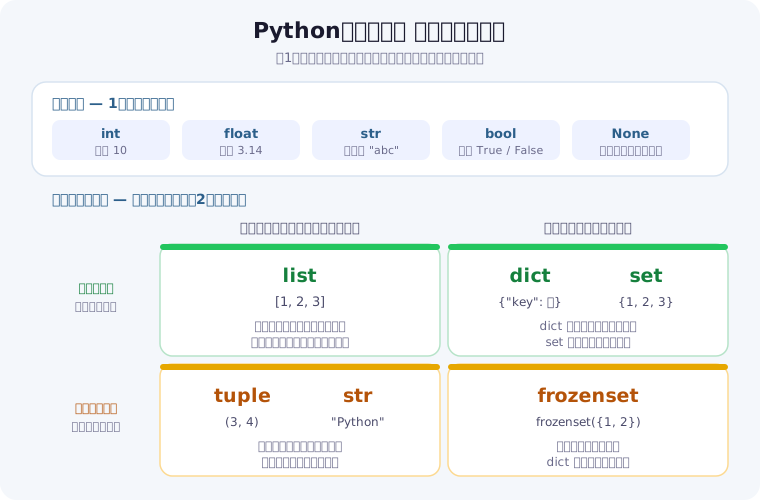
Pythonでは、変数の型を自分で宣言する必要はありません。代入した値によって型が自動的に決まります(この仕組みを動的型付けと呼びます)。まずは全体像を1枚で押さえましょう。1つの値を入れる基本の型と、複数の値をまとめて入れるコレクション型に大きく分かれます。
# 変数の代入
name = "Alice"          # str(文字列)
age = 25                # int(整数)
height = 165.5          # float(浮動小数点数)
is_student = True       # bool(真偽値)
nothing = None          # NoneType(値が無いことを示す)

# 型の確認
print(type(name))       # => <class 'str'>
print(type(age))        # => <class 'int'>
print(type(height))     # => <class 'float'>
print(type(is_student)) # => <class 'bool'>

# 型変換(キャスト)
num_str = "42"
num_int = int(num_str)      # => 42
num_float = float(num_str)  # => 42.0
back_to_str = str(num_int)  # => "42"

# 複数の変数を同時に代入
x, y, z = 1, 2, 3
a = b = c = 0   # 全て同じ値

# 2つの値を入れ替える(一時変数がいらない)
x, y = y, x
print(x, y)             # => 2 1
変数名のつけ方
変数名は英数字とアンダースコアで作り、数字から始めることはできません。Pythonの慣習では小文字とアンダースコアをつなぐ書き方(スネークケース)を使います。名前は短さより「読んで意味がわかること」を優先すると、あとから自分が読むときに助かります。
# ✅ 読みやすい名前
user_name = "Alice"
total_price = 1980
is_active = True         # 真偽値は is_ / has_ で始めると意図が伝わる

# ⚠️ 動くが意味が伝わらない
a = "Alice"
tmp2 = 1980

# ❌ 文法エラーになる名前
# 2nd_place = "Bob"      # 数字から始められない
# class = "A"            # 予約語(if・for・class など)は使えない
使える名前かどうか迷ったら、help("keywords") を実行すると予約語の一覧を確認できます。予約語を変数名にすると SyntaxError になります。
型アノテーション(Python 3.6+)
変数や関数に型ヒント(アノテーション)を付けられます(変数名: 型 = 値 という変数注釈は PEP 526 で Python 3.6 から導入)。実行時に型を強制するものではありませんが、コードの可読性が上がり、エディタの補完や静的解析にも役立ちます。なお、下の list[int] や dict[str, str] のように組み込み型へ角括弧で型を書く記法(サブスクリプト)を変数注釈として実行時に評価させるには Python 3.9 以降が必要です(3.6〜3.8 では typing.List[int] などを使います)。
name: str = "Alice"
age: int = 25
scores: list[int] = [90, 85, 92]
info: dict[str, str] = {"city": "Tokyo", "country": "Japan"}
3. 演算子
演算子は計算や比較を行う記号です。他の言語とほぼ共通ですが、割り算の / が必ず小数を返す点と、整数の商を得る // がある点は最初に押さえておきたい違いです。
算術演算子
a, b = 10, 3

print(a + b)    # => 13   加算
print(a - b)    # => 7    減算
print(a * b)    # => 30   乗算
print(a / b)    # => 3.3333333333333335  除算(結果は常にfloat)
print(a // b)   # => 3    整数除算(小数点以下を切り捨て)
print(a % b)    # => 1    剰余(余り)
print(a ** b)   # => 1000 べき乗
% は「2で割った余りが0なら偶数」のような判定でよく使います。// と % を組み合わせると、秒数を分と秒に分けるといった変換も1行で書けます。
seconds = 185
print(seconds // 60, "分", seconds % 60, "秒")   # => 3 分 5 秒

for n in range(1, 6):
    kind = "偶数" if n % 2 == 0 else "奇数"
    print(n, kind)
# => 1 奇数 / 2 偶数 / 3 奇数 / 4 偶数 / 5 奇数
比較演算子
x = 5
print(x == 5)   # => True   等しい
print(x != 3)   # => True   等しくない
print(x > 3)    # => True   より大きい
print(x < 10)   # => True   より小さい
print(x >= 5)   # => True   以上
print(x <= 5)   # => True   以下

# 範囲判定は数式のようにつなげて書ける(Pythonの便利な書き方)
print(0 <= x <= 10)   # => True   0以上10以下
論理演算子・代入演算子
# 論理演算子
print(True and False)  # => False   両方Trueのときだけ True
print(True or False)   # => True    どちらかTrueなら True
print(not True)        # => False   真偽を反転する

# 代入演算子(複合代入)
n = 10
n += 5   # n = n + 5   → 15
n -= 3   # n = n - 3   → 12
n *= 2   # n = n * 2   → 24
n //= 5  # n = n // 5  → 4
n **= 3  # n = n ** 3  → 64
print(n)               # => 64

# ウォルラス演算子(:= Python 3.8+)代入と判定を同時に行う
import re
if m := re.search(r"\d+", "abc123"):
    print(m.group())   # => 123
and / or は、条件を左から順に評価し、結果が確定した時点で残りを評価しません(短絡評価)。この性質を使うと「値があるときだけメソッドを呼ぶ」といった書き方が安全にできます。
name = ""

# name が空文字なら右側は評価されない(エラーにならない)
if name and name.startswith("A"):
    print("Aで始まる")
else:
    print("該当なし")     # => 該当なし
4. 文字列操作と f-string
プログラムが扱うデータの多くは文字列です。入力値の整形・ファイル名の組み立て・画面表示と、あらゆる場面で登場します。ここでは頻出のメソッドと、値を埋め込む f-string を押さえます。
4.1 よく使う文字列メソッド
s = "Hello, Python!"

# 基本操作
print(len(s))           # => 14   文字数
print(s.upper())        # => HELLO, PYTHON!
print(s.lower())        # => hello, python!
print(s.replace("Python", "World"))  # => Hello, World!
print(s.split(", "))    # => ['Hello', 'Python!']
print(s.startswith("Hello"))  # => True
print(s.endswith("!"))        # => True
print("Python" in s)          # => True
print(s.find("Python"))       # => 7    見つかった位置(無ければ -1)
print(s.count("l"))           # => 2    含まれる個数

# 前後の空白・改行を取り除く(入力値の整形で多用)
print("  空白あり  ".strip())   # => 空白あり
s.upper() を呼んでも s 自体は変わりません。新しい文字列が返るだけです。結果を使いたいときは s = s.upper() のように受け取り直してください。この性質(イミュータブル)はタプルと同じで、2章のデータ型マップでも左下(変更できない × 位置で取り出す)に置いています。
4.2 スライス — 一部を取り出す
角括弧で位置を指定すると、文字列の一部を取り出せます。[開始:終了] の終了位置は含まれません。マイナスを使うと末尾から数えられます。
s = "Hello, Python!"

print(s[0])     # => H          先頭は0番目
print(s[-1])    # => !          末尾は-1
print(s[0:5])   # => Hello      0番目から4番目まで
print(s[7:])    # => Python!    7番目から最後まで
print(s[:5])    # => Hello      先頭から4番目まで
print(s[::-1])  # => !nohtyP ,olleH   逆順
4.3 f-string — 変数を文字列に埋め込む
文字列の前に f を付けると、波括弧の中に変数や式をそのまま書けます。Python 3.6以降で使え、% 演算子や str.format() より短く読みやすいため、新しく書くコードではこれを選べば迷いません。
name = "Alice"
age = 25
price = 1234.5678

print(f"名前: {name}, 年齢: {age}歳")     # => 名前: Alice, 年齢: 25歳

# 式もそのまま書ける
nums = [1, 2, 3]
print(f"合計: {sum(nums)}, 平均: {sum(nums) / len(nums):.1f}")
# => 合計: 6, 平均: 2.0

# 古い書き方(読む機会はあるので形だけ知っておけば十分)
print("名前: %s, 年齢: %d" % (name, age))
print("名前: {}, 年齢: {}".format(name, age))
書式指定のよく使うパターン
波括弧の中でコロンの後ろに書式を指定すると、桁数や寄せ方をそろえられます。表形式の出力やログの整形で役立ちます。
| 書き方 | 結果 | 用途 |
|---|---|---|
f"{3.14159:.2f}" | 3.14 | 小数点以下の桁数をそろえる |
f"{1000000:,}" | 1,000,000 | 3桁区切りで金額を読みやすく |
f"{0.256:.1%}" | 25.6% | 割合をパーセント表示に |
f"{'left':<10}|" | left | | 左寄せ10桁 |
f"{'right':>10}|" | right| | 右寄せ10桁 |
f"{'mid':^10}|" | mid | | 中央寄せ10桁 |
f"{7:03}" | 007 | 0埋めで桁をそろえる |
f"{255:b}" | 11111111 | 2進数(16進は x) |
f"{val=}" | val=42 | デバッグ表示(3.8以降) |
4.4 複数行文字列と結合
# 三重引用符で複数行をそのまま書ける
multiline = """1行目
2行目
3行目"""
print(multiline)
# => 1行目
# => 2行目
# => 3行目

# リストを1つの文字列にまとめる
words = ["Python", "は", "楽しい"]
print("".join(words))        # => Pythonは楽しい
print(" ".join(words))       # => Python は 楽しい

# 数値のリストは str に変換してから結合する
nums = [1, 2, 3]
print(",".join(str(n) for n in nums))   # => 1,2,3
次に読む:正規表現(re)の逆引きチートシート — 「数字だけ抜き出す」「日付を年月日に分ける」など、文字列メソッドだけでは書きにくい検索・置換を実行結果つきで引けます。
5. 条件分岐(if / elif / else)
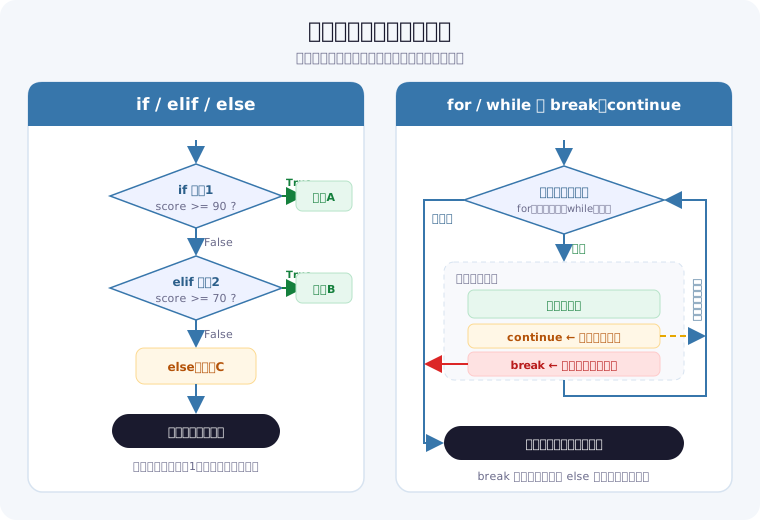
条件によって処理を切り替えるのが if 文です。上から順に条件を判定し、最初に真になったブロックだけを実行して抜けます。この「最初の1つだけ」という性質を知っていると、条件の並べ方で迷わなくなります。
# 基本のif文
score = 85

if score >= 90:
    print("優秀")
elif score >= 70:
    print("合格")
elif score >= 60:
    print("ぎりぎり合格")
else:
    print("不合格")
# => 合格
# (85は「>= 60」も満たすが、先に真になった「>= 70」だけが実行される)

# 三項演算子(条件式)
result = "合格" if score >= 60 else "不合格"
print(result)  # => 合格

# 複合条件
age = 20
has_id = True
if age >= 18 and has_id:
    print("入場できます")     # => 入場できます

# in演算子
fruits = ["apple", "banana", "cherry"]
if "apple" in fruits:
    print("りんごがあります")  # => りんごがあります

# match文(Python 3.10+)
command = "quit"
match command:
    case "quit":
        print("終了します")    # => 終了します
    case "help":
        print("ヘルプを表示します")
    case _:
        print(f"不明なコマンド: {command}")
なお match 文(構造的パターンマッチ)は Python 3.10 で追加された比較的新しい構文です。詳しい記法は Python公式チュートリアル「match 文」を参照してください。
5.1 「空っぽ」は False として扱われる
Pythonでは True / False 以外の値も条件式に書けます。0・空文字列・空のリストや辞書・None は偽として扱われ、それ以外は真になります。この性質を使うと、条件が短く読みやすくなります。
# 偽として扱われる値:False, 0, 0.0, "", [], {}, (), set(), None
items = []

if not items:
    print("リストが空です")        # => リストが空です

# len(items) == 0 と書かなくてよい
name = ""
print("未入力" if not name else name)   # => 未入力
if value: と書くと、value が 0 のときも None のときも同じく偽になります。「値が0であること」と「値が設定されていないこと」を区別したい場面では、if value is not None: と明示してください。集計処理でこの取り違えが起きると、数字が静かに狂うため気づきにくいバグになります。
6. ループ(for / while)
同じ処理を繰り返すのがループです。Pythonの for は「回数を数える」のではなく「並んでいるものを順に取り出す」という発想で書きます。回数を指定したいときだけ range() を使う、と覚えると自然に書けます。上の流れ図の右側も合わせて確認してください。
# forループ - rangeを使った繰り返し
for i in range(5):
    print(i)       # => 0 1 2 3 4 が順に出力される

for i in range(1, 6):
    print(i)       # => 1 2 3 4 5

for i in range(0, 10, 2):
    print(i)       # => 0 2 4 6 8(第3引数は増やす幅)

# リストのループ(インデックスを使わずそのまま取り出す)
fruits = ["apple", "banana", "cherry"]
for fruit in fruits:
    print(fruit)
# => apple
# => banana
# => cherry

# enumerate - 連番つきで取り出す
for i, fruit in enumerate(fruits):
    print(f"{i}: {fruit}")
# => 0: apple
# => 1: banana
# => 2: cherry

# 1始まりにしたいときは start を指定する
for i, fruit in enumerate(fruits, start=1):
    print(f"{i}番目: {fruit}")
# => 1番目: apple  ...

# zip - 複数のリストを同時にループ
names = ["Alice", "Bob", "Carol"]
scores = [85, 90, 78]
for name, score in zip(names, scores):
    print(f"{name}: {score}点")
# => Alice: 85点
# => Bob: 90点
# => Carol: 78点

# whileループ(条件が真である間ずっと繰り返す)
count = 0
while count < 5:
    print(count)
    count += 1     # ← この更新を忘れると無限ループになる
# => 0 1 2 3 4
6.1 break と continue の違い
この2つは混同しやすいので、飛び先を意識して覚えます。continue はその回の残りを飛ばして次の繰り返しへ、break はループそのものを終了して外へ出ます。
for i in range(10):
    if i == 3:
        continue    # 3のときだけ print を飛ばす
    if i == 7:
        break       # 7に達したらループごと終了
    print(i)
# => 0
# => 1
# => 2
# => 4
# => 5
# => 6
break はいちばん内側のループだけを抜けます。二重ループの外側まで抜けたいときは、フラグを使うか、処理を関数にして return で抜けるのが定石です。
6.2 for-else — 最後まで見つからなかったとき
ループに else を付けると、break されずに最後まで回りきったときにだけ実行されます。「探したが見つからなかった」場合の処理を、フラグ変数なしで書けます。
numbers = [3, 8, 12, 5]

for n in numbers:
    if n > 100:
        print(f"100より大きい値を発見: {n}")
        break
else:
    print("100より大きい値はありませんでした")
# => 100より大きい値はありませんでした
次に読む:絵を描かずに作れる★1のミニゲーム5本 — 数当て・じゃんけん・コイン投げなど、条件分岐や繰り返しで勝敗や結果を決めるゲームを、ボタンと文字だけで作れます。
7. リスト(list)
リストは順序があり、あとから中身を変更できるコレクションです。複数の値をまとめて扱いたいときの第一候補で、実務でも登場頻度が高く、筆者が書くコードでもいちばん出番の多い型です。
# リストの作成
nums = [3, 1, 4, 1, 5]
mixed = [1, "hello", True, 3.14, None]   # 型が混ざっていてもよい
empty = []

# 追加と削除
nums.append(9)          # 末尾に追加      => [3, 1, 4, 1, 5, 9]
nums.insert(0, 0)       # 位置0に挿入     => [0, 3, 1, 4, 1, 5, 9]
nums.remove(1)          # 最初の1を削除   => [0, 3, 4, 1, 5, 9]
popped = nums.pop()     # 末尾を取り出して削除
print(popped)           # => 9
nums.extend([10, 11])   # 別のリストを末尾に連結
print(nums)             # => [0, 3, 4, 1, 5, 10, 11]

# 検索・集計
print(5 in nums)         # => True    含まれているか
print(nums.index(5))     # => 4       5がある位置
print(nums.count(1))     # => 1       1の個数
print(len(nums))         # => 7       要素数
print(sum(nums), max(nums), min(nums))   # => 34 11 0
7.1 並べ替えとスライス
nums = [3, 1, 4, 1, 5]

nums.sort()                 # 元のリストを昇順に書き換える
print(nums)                 # => [1, 1, 3, 4, 5]

nums.sort(reverse=True)     # 降順
print(nums)                 # => [5, 4, 3, 1, 1]

original = [3, 1, 4]
new_list = sorted(original) # 新しいリストを返す(元は変わらない)
print(original, new_list)   # => [3, 1, 4] [1, 3, 4]

# 長さ順など、基準を指定して並べ替える
words = ["banana", "fig", "apple"]
print(sorted(words, key=len))   # => ['fig', 'apple', 'banana']

# スライス
a = [0, 1, 2, 3, 4, 5]
print(a[1:4])    # => [1, 2, 3]
print(a[::2])    # => [0, 2, 4]         1つ飛ばし
print(a[::-1])   # => [5, 4, 3, 2, 1, 0] 逆順
nums.sort() は元のリストを書き換えて None を返します。sorted_nums = nums.sort() と書くと sorted_nums が None になってしまうのは、初学者がよく踏む落とし穴です。新しいリストが欲しいときは sorted(nums) を使ってください。
7.2 コピーと入れ子のリスト
a = [0, 1, 2]

# ❌ = は「同じリストに別の名札を付ける」だけ
b = a
b.append(3)
print(a)         # => [0, 1, 2, 3]  a も変わってしまう

# ✅ コピーを作る
a = [0, 1, 2]
c = a.copy()     # スライス a[:] でも同じ
c.append(3)
print(a, c)      # => [0, 1, 2] [0, 1, 2, 3]

# 入れ子のリストは deepcopy が必要
import copy
nested = [[1, 2], [3, 4]]
shallow = nested.copy()
deep = copy.deepcopy(nested)
nested[0].append(99)
print(shallow[0])   # => [1, 2, 99]  内側は共有されたまま
print(deep[0])      # => [1, 2]      完全に別物

# 2Dリスト(行列)
matrix = [[1, 2, 3], [4, 5, 6], [7, 8, 9]]
print(matrix[1][2])   # => 6(2行目の3番目)
この「代入はコピーではない」という挙動は、原因がわかりにくいバグの温床です。仕組みは17章の落とし穴で図を使って解説します。
8. タプル(tuple)
タプルは順序があり、あとから変更できない(イミュータブルな)コレクションです。座標やRGBカラーのような「セットで意味を持ち、途中で変わっては困る組み合わせ」に使います。変更できないことが、うっかり書き換えを防ぐ安全装置になると考えるとイメージしやすいです。
# タプルの作成
point = (3, 4)
rgb = (255, 128, 0)
single = (42,)    # 要素1つのときはカンマが必要((42) はただの整数)
print(type(single))   # => <class 'tuple'>

# 変更しようとするとエラーになる
# point[0] = 9
# => TypeError: 'tuple' object does not support item assignment

# アンパック(分解代入)
x, y = point
print(x, y)    # => 3 4

r, g, b = rgb
print(r, g, b) # => 255 128 0

# アスタリスクでまとめて受け取る
first, *rest = [1, 2, 3, 4, 5]
print(first)  # => 1
print(rest)   # => [2, 3, 4, 5]

# 関数から複数の値を返すときも実はタプル
def min_max(nums):
    return min(nums), max(nums)

low, high = min_max([3, 1, 4])
print(low, high)   # => 1 4

# namedtuple - 要素に名前を付けたタプル
from collections import namedtuple
Point = namedtuple("Point", ["x", "y"])
p = Point(x=3, y=4)
print(p.x, p.y)   # => 3 4
print(p[0], p[1]) # => 3 4  インデックスでも取り出せる
9. 辞書(dict)
辞書は「キー」と「値」を組にして管理するコレクションです。名前で値を引けるため、リストのように「何番目だったか」を覚えておく必要がありません。設定値・集計結果・APIから受け取ったデータなど、実務での出番はリストと同じくらい多い型です。
# 辞書の作成
person = {"name": "Alice", "age": 25, "city": "Tokyo"}
empty = {}
from_keys = dict.fromkeys(["a", "b", "c"], 0)
print(from_keys)                  # => {'a': 0, 'b': 0, 'c': 0}

# アクセスと更新
print(person["name"])             # => Alice
print(person.get("email", "N/A")) # => N/A   存在しないキーは既定値が返る

person["email"] = "alice@example.com"  # 追加
person["age"] = 26                     # 更新(キーがあれば上書き)
del person["city"]                     # 削除
print(person)
# => {'name': 'Alice', 'age': 26, 'email': 'alice@example.com'}

# キー・値・ペアの取得
print(person.keys())    # => dict_keys(['name', 'age', 'email'])
print(person.values())  # => dict_values(['Alice', 26, 'alice@example.com'])

# ループ(キーと値を同時に受け取る)
for key, value in person.items():
    print(f"{key}: {value}")
# => name: Alice
# => age: 26
# => email: alice@example.com

# 辞書の結合(Python 3.9+)
d1 = {"a": 1, "b": 2}
d2 = {"b": 3, "c": 4}
merged = d1 | d2
print(merged)   # => {'a': 1, 'b': 3, 'c': 4}(重複キーは右側が優先)

# 集計に便利な defaultdict
from collections import defaultdict
word_count = defaultdict(int)
for word in "hello world hello python".split():
    word_count[word] += 1
print(dict(word_count))  # => {'hello': 2, 'world': 1, 'python': 1}
person["email"] のように角括弧でアクセスすると、キーが無い場合に KeyError で止まります。外部から来たデータのように「あるかどうかわからない」ときは person.get("email", "未登録") を使うと、既定値を返して処理を続けられます。KeyError が出たときの調べ方はKeyErrorの解説にまとめています。
辞書を結合する | 演算子は Python 3.9 で追加されました(仕様は PEP 584)。それ以前のバージョンでは {**d1, **d2} や d1.update(d2) で結合します。
10. 集合(set)
集合は重複を持たず、順序も保持しないコレクションです。「重複を消したい」「2つのリストの共通項を知りたい」という場面で、ループを書かずに一発で答えが出ます。
a = {1, 2, 3, 4, 5}
b = {3, 4, 5, 6, 7}

# 集合演算
print(a | b)   # => {1, 2, 3, 4, 5, 6, 7}  和集合(どちらかにある)
print(a & b)   # => {3, 4, 5}              積集合(両方にある)
print(a - b)   # => {1, 2}                 差集合(aだけにある)
print(a ^ b)   # => {1, 2, 6, 7}           対称差(どちらか一方だけ)

# 重複の削除によく使う
nums = [1, 2, 2, 3, 3, 3, 4]
unique = list(set(nums))
print(unique)      # => [1, 2, 3, 4](順序は保証されない)

# 元の順序を保ったまま重複を消したいとき
ordered_unique = list(dict.fromkeys(nums))
print(ordered_unique)   # => [1, 2, 3, 4](登場順を維持できる)

# 追加・削除
a.add(6)
a.remove(1)      # 存在しないとKeyError
a.discard(100)   # 存在しなくてもエラーにならない
print(sorted(a)) # => [2, 3, 4, 5, 6]

# 空の集合は set() で作る({} は空の辞書になる)
empty_set = set()
print(type(empty_set), type({}))
# => <class 'set'> <class 'dict'>
list・tuple・dict・set の違い早見表
ここまでの4つのコレクション型は、用途に応じて使い分けます。「順序を保つか」「あとから変更できるか」「重複を許すか」の3点で選ぶと迷いません。
| 型 | 書き方 | 順序 | 重複 | 変更可否 | 主な用途 |
|---|---|---|---|---|---|
| list | [1, 2] | 保持する | 許可 | 変更可(ミュータブル) | 順序ありの汎用コレクション |
| tuple | (1, 2) | 保持する | 許可 | 変更不可(イミュータブル) | 変わらない組(座標・関数の戻り値) |
| dict | {"key": 値} | 保持する(3.7+) | キーは不可 | 変更可(ミュータブル) | キーから値を高速に検索 |
| set | {1, 2}/空は set() | 保持しない | 不可 | 変更可(ミュータブル) | 重複の排除・集合演算 |
11. 内包表記
内包表記は、リスト・辞書・集合を1行で組み立てる Python 特有の記法です。「空のリストを作る → for で回す → append する」という3行の定型を1行に圧縮できます。Pythonらしいコードを読むうえで避けて通れない書き方なので、形だけでも覚えておくと他人のコードが読めるようになります。
# 通常のforループで書くと3行
squares = []
for x in range(5):
    squares.append(x ** 2)
print(squares)   # => [0, 1, 4, 9, 16]

# 内包表記なら1行
squares = [x ** 2 for x in range(5)]
print(squares)   # => [0, 1, 4, 9, 16]
読むときは後ろの for から先に読むのがコツです。「range(5) の各 x について、x ** 2 を集める」と読み下せます。
# 条件で絞り込む(ifを後ろに付ける)
evens = [x for x in range(10) if x % 2 == 0]
print(evens)     # => [0, 2, 4, 6, 8]

# 要素を加工する
words = ["hello", "world", "python"]
upper = [w.upper() for w in words]
print(upper)     # => ['HELLO', 'WORLD', 'PYTHON']

# 辞書内包表記
square_dict = {x: x ** 2 for x in range(5)}
print(square_dict)      # => {0: 0, 1: 1, 2: 4, 3: 9, 4: 16}

# 集合内包表記(重複が自動で消える)
unique_lengths = {len(w) for w in words}
print(unique_lengths)   # => {5, 6}

# 入れ子のリストを平らにする
matrix = [[1, 2, 3], [4, 5, 6], [7, 8, 9]]
flat = [num for row in matrix for num in row]
print(flat)      # => [1, 2, 3, 4, 5, 6, 7, 8, 9]

# ジェネレーター式(角括弧を丸括弧にするだけ)
gen = (x ** 2 for x in range(1000000))
print(next(gen))   # => 0     必要になった分だけ計算する
print(sum(gen))    # => 333332833333500000  残り全部の合計
ジェネレーター式は、すべての要素をメモリに載せずに1つずつ計算します。100万件のような大きなデータを合計するだけなら、リストを作らないこの書き方のほうがメモリを節約できます。仕組みの詳細は関数ガイドのジェネレーターで解説しています。
12. 関数(def)の基本
同じ処理を何度も書き写す代わりに、名前を付けて呼び出せるようにするのが関数です。関数を使えるようになると、コードの見通しが一気に良くなり、直す場所が1か所で済むようになります。ここでは「基本構文としての関数」に絞って扱います。lambda・デコレーター・ジェネレーターといった応用はPython関数の使い方と一覧にまとめています。
12.1 定義と呼び出し
def greet(name):        # def 関数名(引数):
    return f"こんにちは、{name}さん"   # 中身は4スペース字下げ

print(greet("Alice"))   # => こんにちは、Aliceさん
print(greet("Bob"))     # => こんにちは、Bobさん
return は結果を呼び出し元へ返し、その時点で関数を終了します。return を書かない関数は None を返します。「画面に出す」だけなら print、「計算結果を渡す」なら return、という使い分けです。
def show(x):
    print(x)            # 表示するだけで、値は返さない

result = show(10)       # => 10
print(result)           # => None
12.2 引数の渡し方
# 位置引数:書いた順に対応する
def area(width, height):
    return width * height

print(area(4, 3))               # => 12

# キーワード引数:名前を指定すれば順番は自由
print(area(height=3, width=4))  # => 12

# デフォルト引数:省略されたときの値をあらかじめ決めておく
def greet(name, suffix="さん"):
    return f"こんにちは、{name}{suffix}"

print(greet("Bob"))             # => こんにちは、Bobさん
print(greet("Bob", "先生"))      # => こんにちは、Bob先生
[] や {} を書かないdef f(items=[]) と書くと、そのリストは関数の呼び出しごとではなく定義時に1つだけ作られ、以降ずっと共有されます。前回の呼び出し結果が次に残る、という直感に反するバグになります。回避方法は17章の落とし穴で具体例つきに解説します。
12.3 引数の個数が決まらないとき(*args / **kwargs)
引数の前にアスタリスクを付けると、いくつ渡されるかわからない引数をまとめて受け取れます。*args はタプル、**kwargs は辞書として届きます。名前は慣習で、実際は自由に付けられます。
def total(*nums):           # 位置引数をまとめてタプルで受け取る
    return sum(nums)

print(total(1, 2, 3))       # => 6
print(total(10, 20))        # => 30

def show(**info):           # キーワード引数をまとめて辞書で受け取る
    for key, value in info.items():
        print(f"{key}={value}")

show(name="Alice", age=25)
# => name=Alice
# => age=25
12.4 複数の値を返す
return にカンマで並べると、まとめて返せます。実体はタプルなので、受け取る側で分解できます。
def stats(nums):
    return min(nums), max(nums)

low, high = stats([3, 1, 4])
print(low, high)     # => 1 4

result = stats([3, 1, 4])
print(result)        # => (1, 4)  分解せずに受け取るとタプル
12.5 スコープ — 関数の中と外は別世界
関数の中で作った変数は、その関数の中でしか使えません(ローカル変数)。関数の外の変数を関数の中から読むことはできますが、代入すると同名の別変数が新しく作られます。
count = 0

def bump():
    count = 1        # 関数の中だけの新しい変数
    return count

print(bump())        # => 1
print(count)         # => 0   外側は変わっていない
外側の変数そのものを書き換えたい場合は global を宣言しますが、どこで値が変わったのか追いにくくなるため多用は避けます。基本は「引数で受け取り、return で返す」で書くほうが、あとから読んだときに壊しにくいコードになります。
count = 0

def bump_global():
    global count     # 外側の count を書き換える宣言
    count += 1

bump_global()
print(count)         # => 1

# ✅ 推奨:値を受け取って返す書き方なら global は不要
def bumped(n):
    return n + 1

count = bumped(count)
print(count)         # => 2
スコープの細かい規則(nonlocal や UnboundLocalError の原因)は、関数ガイドのスコープで詳しく扱っています。
13. クラス(class)の基本
クラスは「データ」と「そのデータを使う処理」をひとまとめにする仕組みです。たとえば「犬」を扱うなら、名前や年齢というデータと、吠える・年齢を判定するといった処理をセットで持たせます。最初のうちは自分で書く機会が少なくても、ライブラリを使うと必ず登場するため、読めるようにしておく価値があります。
13.1 クラスを定義してインスタンスを作る
class Dog:
    def __init__(self, name, age):   # インスタンス作成時に呼ばれる初期化処理
        self.name = name             # 属性(このインスタンスが持つデータ)
        self.age = age

    def bark(self):                  # メソッド(このインスタンスができること)
        return f"{self.name}: ワン!"

    def is_puppy(self):
        return self.age < 1

pochi = Dog("ポチ", 3)      # インスタンスを作る(__init__ が実行される)
print(pochi.name)          # => ポチ
print(pochi.bark())        # => ポチ: ワン!
print(pochi.is_puppy())    # => False
メソッドの第1引数 self は「そのインスタンス自身」を指します。pochi.bark() と呼ぶと、Pythonが自動的に pochi を self として渡してくれるため、呼び出し側で書く必要はありません。self を書き忘れて TypeError になるのは、クラスを書き始めた人の定番のつまずきです。
13.2 クラス名の慣習と、複数インスタンス
クラス名は先頭を大文字にする(アッパーキャメルケース)のが慣習です。1つのクラスからインスタンスをいくつでも作れ、それぞれが自分の属性を持ちます。
pochi = Dog("ポチ", 3)
koro = Dog("コロ", 0)

print(pochi.bark())        # => ポチ: ワン!
print(koro.bark())         # => コロ: ワン!
print(pochi.is_puppy(), koro.is_puppy())   # => False True
13.3 継承 — 既存のクラスを土台にする
クラス名の後ろに親クラスを書くと、その機能を引き継いだ新しいクラスを作れます。super() で親の処理を呼び出し、同名のメソッドを定義すれば動きを上書きできます。
class Puppy(Dog):              # Dog を引き継ぐ
    def __init__(self, name):
        super().__init__(name, 0)   # 親の __init__ を呼ぶ(年齢は0固定)

    def bark(self):            # 親のメソッドを上書きする
        return f"{self.name}: キャン!"

koro = Puppy("コロ")
print(koro.bark())         # => コロ: キャン!   上書きしたほうが呼ばれる
print(koro.is_puppy())     # => True           親から引き継いだメソッド
print(isinstance(koro, Dog))   # => True       Puppy は Dog でもある
クラス変数・クラスメソッド・__str__ などの特殊メソッド・@dataclass といった一歩進んだ書き方は、関数ガイドのクラスと特殊メソッドで扱っています。まずは「__init__ で属性を持たせ、メソッドで操作する」という骨格だけ掴めれば十分です。
次に読む:tkinter で NameError が出たときのクラス版の書き方 — 関数の中から別のスコープにあるラベルを参照して NameError になる原因と、ラベルやボタンを self. で持たせるクラス版に書き換えた短いコード例です。
14. モジュールの import
Pythonには、書かなくても使える機能が大量に付属しています。それを呼び出すのが import です。自分で全部書かずに済ませるのがPythonの強みで、その入口がこの1行です。
14.1 3つの書き方
# ① モジュールごと読み込む(どこ由来の機能か明確になる)
import math
print(math.sqrt(16))        # => 4.0
print(math.floor(3.7))      # => 3   切り捨て

# ② 必要な部分だけ読み込む(呼び出しが短くなる)
from datetime import date
print(date(2026, 8, 10).strftime("%Y/%m/%d"))   # => 2026/08/10

# ③ 別名を付けて読み込む(長い名前を短く)
import statistics as st
print(st.mean([1, 2, 3, 4]))   # => 2.5
どれを使っても動きますが、読む人が「この関数はどこから来たのか」を追えるかどうかで選ぶと迷いません。from モジュール import * という全部まとめて読み込む書き方もありますが、名前の衝突が起きたときに原因を追いにくくなるため避けられています。
14.2 標準ライブラリと外部ライブラリ
math や datetime のように最初から付属しているものを標準ライブラリ、pip install で追加するものを外部ライブラリと呼びます。import の書き方はどちらも同じで、違いは「導入が必要かどうか」だけです。
# 標準ライブラリ(インストール不要)
import json, random, os
from pathlib import Path

print(Path("data") / "log.txt")
# => data\log.txt(Windows)/ data/log.txt(macOS・Linux)

# 外部ライブラリ(事前に pip install pandas が必要)
# import pandas as pd
用途別にどのライブラリを選べばよいかは、Pythonライブラリ一覧(標準ライブラリ・外部ライブラリ)にまとめています。ModuleNotFoundError が出たときの対処はエラー解決ページを参照してください。
14.3 自分で書いたファイルを import する
同じフォルダに置いた .py ファイルは、ファイル名(拡張子なし)でそのまま import できます。処理が増えてきたらファイルを分け、役割ごとにまとめると読みやすくなります。
# mymath.py
"""簡単な計算をまとめた自作モジュール"""

def add(a, b):
    return a + b

def double(x):
    return x * 2

if __name__ == "__main__":
    # このファイルを直接実行したときだけ動く(import されたときは動かない)
    print("mymath.py を直接実行しました")
# main.py(mymath.py と同じフォルダに置く)
import mymath
from mymath import double

print(mymath.add(3, 4))   # => 7
print(double(5))          # => 10
if __name__ == "__main__": は、直接実行したときだけ動かしたい処理を書く場所です。動作確認用のコードをここに置いておけば、他のファイルから import したときに勝手に実行される事故を防げます。
次に読む:VSCodeでだけ import に失敗するときの切り分け — コマンドプロンプトでは動くのに VSCode で ModuleNotFoundError になるとき、入れた Python と実行している Python が同じかを1行で確かめる手順です。
15. 例外処理(try / except)
例外処理を使うと、エラーが発生してもプログラムをクラッシュさせずに対処できます。ユーザーの入力やファイル・通信のように自分では結果をコントロールできない処理を扱うときに必要になります。実際に出たエラーメッセージから原因を特定する方法は、よくあるエラーと解決法にまとめています。
15.1 基本の形(try / except / else / finally)
try の中でエラーが起きると、その種類に対応する except へ処理が移ります。else はエラーが起きなかったときだけ、finally は起きても起きなくても必ず実行されます。
def divide(text):
    try:
        num = int(text)
        result = 10 / num
    except ValueError:
        print("数字を入力してください")
    except ZeroDivisionError:
        print("0で割ることはできません")
    else:
        print(f"結果: {result}")     # 例外が出なかったときだけ
    finally:
        print("処理終了")             # 常に実行される

divide("5")
# => 結果: 2.0
# => 処理終了

divide("abc")
# => 数字を入力してください
# => 処理終了

divide("0")
# => 0で割ることはできません
# => 処理終了
15.2 自分でエラーを発生させる(raise)
受け取った値が想定外なら、そのまま処理を進めずに raise でエラーを起こします。おかしなデータが奥まで流れ込む前に止めることで、原因の特定がずっと楽になります。
def validate_age(age):
    if not isinstance(age, int):
        raise TypeError("年齢は整数で入力してください")
    if age < 0 or age > 150:
        raise ValueError(f"年齢の範囲が不正です: {age}")
    return age

print(validate_age(30))      # => 30

try:
    validate_age(-1)
except ValueError as e:
    print("捕捉:", e)         # => 捕捉: 年齢の範囲が不正です: -1

# 独自の例外クラスを作ることもできる
class AppError(Exception):
    def __init__(self, message, code=None):
        super().__init__(message)
        self.code = code

try:
    raise AppError("アプリエラーが発生しました", code=404)
except AppError as e:
    print(f"エラー {e.code}: {e}")
# => エラー 404: アプリエラーが発生しました
15.3 よく出会う例外の種類
どの except を書けばよいかは、実際に出たエラー名で決めます。まずはこの7つを覚えておけば、初学者が遭遇する場面の多くをカバーできます。
| 例外名 | 起きる状況 | よくある原因 |
|---|---|---|
ValueError | 型は合っているが値が不正 | int("abc") |
TypeError | 型が合わない操作をした | "a" + 1 |
KeyError | 辞書に無いキーを指定した | d["無い"] |
IndexError | リストの範囲外を指定した | 要素3つのリストで [5] |
FileNotFoundError | ファイルが見つからない | パスの打ち間違い |
ZeroDivisionError | 0で割った | 件数0での平均計算 |
AttributeError | 存在しない属性・メソッドを呼んだ | None に対するメソッド呼び出し |
16. ファイル操作
ファイルの読み書きは with open(...) as f: の形で書きます。with を使うと処理が終わった時点で自動的にファイルが閉じられるため、閉じ忘れによるトラブルを防げます。日本語を扱うときは encoding="utf-8" の指定を忘れないでください(Windowsでは既定の文字コードが異なり、文字化けや UnicodeDecodeError の原因になります)。
# ファイルの書き込み(with文を使うのが推奨)
with open("data.txt", "w", encoding="utf-8") as f:
    f.write("Hello, Python!\n")
    f.write("ファイル操作の例\n")

# ファイルの読み込み
with open("data.txt", "r", encoding="utf-8") as f:
    content = f.read()      # 全内容を文字列で
    print(content)

# 行ごとに読み込む
with open("data.txt", "r", encoding="utf-8") as f:
    for line in f:
        print(line.strip())

# 追記モード
with open("data.txt", "a", encoding="utf-8") as f:
    f.write("追加行\n")

# JSONファイルの読み書き
import json

data = {"name": "Alice", "scores": [90, 85, 92]}
with open("data.json", "w", encoding="utf-8") as f:
    json.dump(data, f, ensure_ascii=False, indent=2)

with open("data.json", "r", encoding="utf-8") as f:
    loaded = json.load(f)
print(loaded["name"])  # => Alice

# pathlib を使ったパス操作(Python 3.4+)
from pathlib import Path

p = Path("data.txt")
print(p.exists())       # ファイルが存在するか
print(p.stem)           # "data"(拡張子なし)
print(p.suffix)         # ".txt"(拡張子)
print(p.parent)         # 親ディレクトリ

# ディレクトリのファイル一覧
folder = Path(".")
for f in folder.glob("*.py"):
    print(f)
pathlib は文字列連結よりも安全・簡潔にパスを扱える標準ライブラリで、Python 3.4 で追加されました。利用できるメソッドの一覧は Python公式ドキュメント「pathlib」にまとまっています。
次に読む:open() で UnicodeDecodeError が出たときの直し方 — Shift_JIS(cp932)で保存された CSV などを読んで止まったとき、open() と Path.read_text() に encoding="cp932" を書く形をコード例で確認できます。
17. 実践ヒント・よくある落とし穴
基本構文を覚えても、実際にコードを書き始めると「動くけど何かおかしい」と感じる場面が必ず出てきます。ここでは初学者がつまずきがちなポイントと、Python らしい書き方の指針をまとめます。いずれもエラーメッセージが出ないまま結果だけ狂うタイプの問題なので、先に知っておくと調査時間を大きく節約できます。
17.1 代入はコピーではない — 同じデータを2つの名前が指す
Pythonの変数は「値を入れる箱」ではなく、データに付ける名札です。b = a と書いても中身は複製されず、名札が1枚増えるだけです。そのため b を書き換えると a も変わります。この挙動は次の 17.2・17.3・17.4 の落とし穴すべての根っこにあります。
![Pythonの代入と参照の図解。b = a と書くと変数 a と b が同じリストを指すため b.append(3) をすると a も [1, 2, 3] に変わる。c = a.copy() では別のリストが作られるため c.append(4) をしても a は [1, 2] のまま](images/syntax-variable-reference.svg)
a = [1, 2]

# ❌ 同じリストを指すだけ
b = a
b.append(3)
print(a)          # => [1, 2, 3]   a も変わってしまう
print(a is b)     # => True        同一のオブジェクト

# ✅ 別のリストを作る
a = [1, 2]
c = a.copy()
c.append(4)
print(a, c)       # => [1, 2] [1, 2, 4]
print(a is c)     # => False

# 数値や文字列は変更できない型なので、この問題は起きない
x = 10
y = x
y += 1
print(x, y)       # => 10 11
影響を受けるのは list・dict・set のような変更できる型です。関数に渡したリストを関数の中で変更すると、呼び出し元のリストまで変わる点にも同じ理由で注意してください。
17.2 「等しい」の落とし穴 — == と is の使い分け
初学者がつまずきやすいのが == と is の混同です。== は値の等価性、is は同一オブジェクトかどうかを判定します。原則として、値を比較したいときは == を使い、is は None・True・False との比較にだけ使うのが安全です。
a = [1, 2, 3]
b = [1, 2, 3]
print(a == b)   # => True   値が同じ
print(a is b)   # => False  別のオブジェクト

# None の判定は is で行うのが慣例
x = None
if x is None:          # ✅ 正しい
    print("xは未設定")  # => xは未設定
if x == None:          # ❌ 動くが非推奨(PEP 8)
    pass
17.3 デフォルト引数の罠 — 可変オブジェクトを書いてはいけない
関数のデフォルト引数に [] や {} を書くと、同じオブジェクトが関数呼び出し間で共有されるという直感に反する挙動になります。これは Python の言語仕様上の重要な落とし穴です。
# ❌ 罠:デフォルト引数にリストを直接書く
def add_item(item, items=[]):
    items.append(item)
    return items

print(add_item("a"))   # => ['a']
print(add_item("b"))   # => ['a', 'b']  ← 前の呼び出しの結果が残る!
print(add_item("c"))   # => ['a', 'b', 'c']

# ✅ 正しい書き方:None を使って関数内で初期化
def add_item(item, items=None):
    if items is None:
        items = []
    items.append(item)
    return items

print(add_item("a"))   # => ['a']
print(add_item("b"))   # => ['b']  ← 期待通り
17.4 ループ中にリストを変更してはいけない
反復処理中のリストに対して append・remove を行うと、インデックスがずれて要素が飛ばされたり、無限ループになることがあります。安全に書くには、新しいリストを作って受け取るか、コピーを反復対象にするのが鉄則です。
nums = [1, 2, 4, 6, 7]

# ❌ 反復中の remove は要素を飛ばす
for n in nums:
    if n % 2 == 0:
        nums.remove(n)
# 結果: [1, 4, 7]  ← 偶数を全部消せず 4 が残ってしまう。
# 2 を削除した時点で後続要素が前へ詰まり、走査位置が 1 つ進むことで
# 直後に来た 4 が読み飛ばされる(インデックスと要素の対応がずれる)

# ✅ 内包表記で新しいリストを作る(推奨)
nums = [1, 2, 4, 6, 7]
odd = [n for n in nums if n % 2 != 0]
# 結果: [1, 7]

# ✅ コピーを反復対象にする
for n in nums[:]:   # スライスでコピー
    if n % 2 == 0:
        nums.remove(n)
# 結果: [1, 7]
17.5 文字列結合は + ではなく join を使う
CPython には += による文字列の連結を速くする最適化がありますが、言語仕様の保証ではありません。他の実装や条件によっては毎回コピーが起きて、要素数が増えると遅くなります。PEP 8 もこの最適化に頼らず、性能が要る箇所では str.join を使うよう勧めています。たくさんつなぐときは join が確実で、読みやすさも上がります。
words = ["Python", "is", "fun"]

# ❌ 実装や条件によっては遅くなる書き方
result = ""
for w in words:
    result += w + " "

# ✅ join を使う(高速・短い)
result = " ".join(words)

# 数値を結合する場合は str に変換
nums = [1, 2, 3]
result = ",".join(str(n) for n in nums)   # "1,2,3"
17.6 例外は「具体的な型」で受け止める
引数なしの裸の except:(= except BaseException:)は、KeyboardInterrupt(Ctrl+C)や SystemExit まで捕まえてしまい、プログラムを正常に止められなくなるため書いてはいけません。一方 except Exception: はこれらの BaseException 直系の例外は捕捉しませんが、想定外のバグまで握りつぶしてしまうため、通常は避けるべきです。想定する例外の型を明示することが、堅牢なコードへの第一歩です(例外クラスの継承関係は Python公式ドキュメント「組み込み例外」で確認できます)。
# ❌ ベア except は禁止(Ctrl+C や SystemExit まで握りつぶす)
try:
    do_something()
except:
    pass  # 何が起きたのかわからない・プログラムを止められなくなる

# ❌ 広すぎる
try:
    do_something()
except Exception as e:
    # KeyboardInterrupt / SystemExit は素通りするが、バグまで含めて何でも握りつぶす
    print(f"エラー: {e}")

# ✅ 想定する例外を具体的に
try:
    num = int(user_input)
    result = 10 / num
except ValueError:
    print("整数を入力してください")
except ZeroDivisionError:
    print("0 では割れません")
17.7 内包表記は「読める範囲」で使う
リスト内包表記は強力ですが、ネストが深くなったり条件が複雑になると一行で読めなくなります。3 行以上に分解できるなら、通常の for ループに戻す方が読みやすいのが現場の感覚です。
# ✅ シンプルな内包表記(OK)
squares = [x**2 for x in range(10)]
evens = [x for x in nums if x % 2 == 0]

# ⚠️ 複雑になったら通常 for に戻す
# 読めない例
result = [[x*y for y in range(3) if y > 0] for x in range(5) if x % 2 == 1]

# 読める書き方
result = []
for x in range(5):
    if x % 2 != 1:
        continue
    row = []
    for y in range(3):
        if y > 0:
            row.append(x * y)
    result.append(row)
17.8 小数の計算には誤差が出る
0.1 + 0.2 が 0.3 にならないのは、Pythonの不具合ではなくコンピュータが小数を2進数で近似して保持しているためです(多くの言語で共通の挙動です)。金額や在庫のように1円・1個のズレが許されない計算では、標準ライブラリの decimal を使うと期待どおりの結果になります。
print(0.1 + 0.2)              # => 0.30000000000000004
print(0.1 + 0.2 == 0.3)       # => False   ここでバグが生まれる

# ✅ 誤差を許容して比較する
print(abs((0.1 + 0.2) - 0.3) < 1e-9)   # => True

# ✅ 金額計算は decimal を使う
from decimal import Decimal
print(Decimal("0.1") + Decimal("0.2"))            # => 0.3
print(Decimal("0.1") + Decimal("0.2") == Decimal("0.3"))   # => True
Decimal に渡すときは Decimal(0.1) ではなく Decimal("0.1") と文字列で書くのが要点です。float を渡すと、誤差を含んだ値がそのまま取り込まれてしまいます。
「動けば良い」コードと「Python らしい」コードの差は、ループ・条件分岐の組み立て方・命名・例外の扱い方に現れます。本サイトの初心者用アプリ89本・中級者用アプリ90本では、ここで紹介したパターンが繰り返し登場します。数多くの実例に触れるうちに、Python らしい書き方は少しずつ身についていきます。
次に読む:写経→改造→ゼロから作り直す、3段階の学習法 — 1本のアプリを「手で打って動かす」「1か所を自分で変える」「何も見ずに作り直す」の順で扱い、写経から自作へ進む方法です。
文法ミスで出るエラーと直し方(早見表)
書き方の誤りで出るエラーを、書いたコードから引けるようにまとめました。エラー文は Python 3.12.10 で実際に表示されたものです(古いバージョンでは文言が異なることがあります)。英文のメッセージから探したい場合や、ここにない構文エラーはエラー解決ページの構文エラー早見表にまとめています。
| 書いたコード | エラー文(Python 3.12.10) | 原因 | 直し方 |
|---|---|---|---|
if x > 0 | SyntaxError: expected ':' | 行末のコロンを忘れた | if x > 0: と書く(for・def・class なども同じ) |
if x = 1: | SyntaxError: invalid syntax. Maybe you meant '==' or ':=' instead of '='? | 比べるのに代入の = を使った | if x == 1: と書く |
print("a" | SyntaxError: '(' was never closed | 閉じかっこを忘れた | print("a") と書く |
s = "abc | SyntaxError: unterminated string literal (detected at line 1) | 文字列の引用符を閉じていない | s = "abc" と書く |
1 = x | SyntaxError: cannot assign to literal here. Maybe you meant '==' instead of '='? | 代入の左右が逆 | x = 1 と書く(左が変数) |
class = 1 | SyntaxError: invalid syntax | 予約語を変数名にした | class_ など別の名前にする(予約語一覧) |
全角スペースが入った行(x = 1) | SyntaxError: invalid non-printable character U+3000 | 全角スペースが混ざった | 半角スペースに打ち直す |
print("a") | SyntaxError: invalid character '(' (U+FF08) | かっこが全角 | 半角の ( ) に打ち直す |
if True: の次の行を字下げしない | IndentationError: expected an indented block after 'if' statement on line 1 | ブロックの中身を字下げしていない | 次の行を半角スペース4個で字下げする |
| ブロックでない行を字下げした | IndentationError: unexpected indent | 不要な字下げ | 行頭を前の行とそろえる |
| 字下げを戻した位置が外側の段と合わない(4個→2個など) | IndentationError: unindent does not match any outer indentation level | 戻した幅がどの段とも一致しない | 外側のブロックと同じ幅にそろえる |
| 同じブロックでタブと半角スペースを混ぜた | TabError: inconsistent use of tabs and spaces in indentation | タブとスペースの混在 | 字下げをすべて半角スペース4個に統一する |
他の言語の書き方(i++・else if・中括弧)で出るエラーは、他の言語との違いの節に載せています。
これらの文法エラーは、プログラムが1行も実行される前に検出されます。次のファイルは1行目に print("開始") がありますが、3行目のコロン忘れのため何も表示されずに止まります。
print("開始")
score = 80
if score >= 60
    print("合格")
実行すると、次のように表示されます(ファイルのパスは環境によって変わるため、途中を「...」で省略しています)。
  File "C:\...\sample.py", line 3
    if score >= 60
                  ^
SyntaxError: expected ':'
line 3 が問題の行、^ が Python が引っかかった位置です。まずこの2つを見て、表の「書いたコード」と見比べると原因を絞り込めます。
よくある質問(FAQ)
Q. Pythonの基本構文はどこまで覚えれば書けるようになりますか?
すべてを暗記する必要はありません。print とインデント・変数・条件分岐・ループ・リストの5つが書ければ、短いプログラムはひととおり形になります。本ページの17章のうち最初に必要なのもその5章(1・2・5・6・7章)で、残りは必要になったときに調べて使う進め方で十分です。覚える量を増やすより、手を動かして書く回数を増やすほうが早く身につきます。
Q. インデントは半角スペース何個にすればいいですか?
半角スペース4個が標準です。Pythonのコーディング規約であるPEP 8が4スペースを推奨しています。大切なのは同じブロックの中で幅をそろえることで、タブと半角スペースを混ぜるとTabErrorになります。多くのエディタはタブキーで半角スペースが入る設定にできるので、最初にその設定を確認しておくと崩れにくくなります。
Q. == と is はどう違いますか?
== は値が同じかどうか、is は同じオブジェクトそのものかどうかを判定します。中身が同じ2つのリストは == では True になりますが、is では False です。値を比べたいときは ==、Noneかどうかを確かめたいときは is None、と使い分けるのが安全です。
Q. 行の終わりにセミコロンは必要ですか?
必要ありません。Pythonは改行が文の区切りなので、行末にセミコロンを書かないのが通常の書き方です。セミコロンで複数の文を1行に詰めること自体は文法上できますが、読みにくくなるため避けられます。他の言語の習慣で付けてしまった場合は、外しても動作は変わりません。
Q. 変数に型を書かなくてもいいのですか?
書かなくても動きます。Pythonは代入した値から型が決まる動的型付けの言語で、intやstrといった宣言は不要です。ただし規模が大きくなると型が追いにくくなるため、age: int = 25 のような型ヒント(型アノテーション)を添える書き方が広く使われています。型ヒントは実行時に型を強制するものではなく、読み手とエディタの補完・静的解析を助けるための注釈です。
Q. コピーしたコードが IndentationError になるのはなぜですか?
字下げの幅がそろっていないか、タブと半角スペースが混ざっているのが典型的な原因です。Webページからコピーすると、元のタブが別の幅に変換されて崩れることがあります。エラーが出た行とその前後の字下げを半角スペース4個に統一し直すのが確実な対処です。エディタで空白文字を表示する設定にすると、混在がひと目でわかります。
Q. Pythonのバージョンによって書き方は変わりますか?
基本の部分はほとんど変わりませんが、新しい構文が追加されることがあります。本ページで扱ったものでは、f-stringがPython 3.6、ウォルラス演算子(:=)が3.8、辞書の結合演算子(|)が3.9、match文が3.10で使えるようになりました。古いバージョンではこれらがエラーになるため、動かないときはまず python --version でバージョンを確認してください。
Q. 基本構文を覚えたのにプログラムが書けません。次は何をすればいいですか?
文法を知っていることと作れることは別のスキルなので、動くコードを読んで真似るところから始めるのが取り組みやすい方法です。まず短いプログラムをそのまま写し、次に一部を自分の目的に合わせて書き換えてみてください。本サイトでは初心者向けのGUIアプリ89本を公開しているので、興味のあるものを選んで手を動かすところから始められます。書籍で題材ごと手に入れたいなら、Excel・PDF・メールの自動化を作りながら学ぶ退屈なことはPythonにやらせよう 第3版(当サイトのおすすめ本ランキング総合3位)が取り組みやすい1冊です。
本ページは、生成AIを活用して下書きし、運営者が内容を確認・編集したうえで公開しています。AIの利用方針は免責事項をご覧ください。
基本構文を押さえたら、目的に近い1本へ進むと停滞しません。
- 作りながら覚える(初心者):練習アプリ・お題集 — レベル別のお題と完成コードで、このページの文法を手を動かして定着させます
- もう一段深める(中級へ):関数ガイド(引数の設計から lambda・デコレーターまで) — 12章で押さえた
defの続きを、組み込み関数の一覧とあわせて扱います - 投資に使う:Pythonで作る投資ツールの連載(全15回) — yfinance・pandas などで株価データの取得からポートフォリオの可視化・配当管理までを作ります(中級者向け。プログラミング学習が目的で、投資助言ではありません)
Webで調べた内容を書籍で体系的に補うと、断片的な知識がつながりやすくなります。図解豊富な入門書から実践書まで、Pythonの参考書おすすめランキング11選で学習段階別にまとめています。学習を快適に進める環境が気になる方は、Python学習・開発向けのおすすめPCスペックもあわせてどうぞ。