Python 関数 完全ガイド
def文の書き方を冒頭の早見表で結論から示し、引数・戻り値の基本、実測した引数の渡し方と型ヒント、組み込み関数71個の用途別一覧、lambda式・クロージャ・デコレーター・ジェネレーターまで、実行して確認したコード例つきで解説します。
def 関数名(引数):で定義し、関数名()で呼び出します。結果はreturnで返し、書かなければ戻り値はNoneです。- 引数は位置・キーワード・デフォルト・
*args・**kwargs・キーワード専用・位置専用の組み合わせで、defの括弧に書ける順番は決まっています。 importなしで使える組み込み関数は71個です(公式ドキュメントの一覧・2026年8月12日確認)。探すときは5章の用途別一覧から引けます。
def の書き方をゼロから知りたいなら 1章 → 2章 → 3章 の順に読めば、自分で関数を作って呼び出せるところまで進めます。「この処理をする関数、最初から用意されていないかな?」を探しに来た方は、5章の組み込み関数一覧(全71個・用途別)へ直行してください。lambda やデコレーターなど応用だけ確認したい方は、6章以降が該当します。エラーや「思った値にならない」症状から探したい方は、関数でよくあるミスと直し方の表が入口です。
出力コメントを書いているコードは Python 3.12 で実行し、表示された結果をそのまま載せています(設計の話に出てくる一部の例は、説明のための断片です)。文法全体をまず見渡したい方はPython基本構文の一覧、エラーで止まっている方はよくあるエラー解決が近道です。
- 結論:Python関数の書き方早見表
- 1. 関数の基本(def文)
- 2. 引数の種類
- 引数の渡し方を実測:値渡し?参照渡し?
- 引数と戻り値に型を書く(型ヒント)
- 3. 戻り値(return)
- 4. スコープ(変数の有効範囲)
- 5. Python組み込み関数一覧(用途別・全71個)
- 用途別の早見表
- よく使う組み込み関数の実行例
- 6. lambda式(無名関数)
- 7. 高階関数(map / filter / sorted / functools)
- 8. クロージャ
- 9. デコレーター
- 10. ジェネレーター
- 再帰関数
- 11. クラスと特殊メソッド(概要)
- 12. 関数設計の鉄則・実践ヒント
- 関数でよくあるミスと直し方(早見表)
- 13. よくある質問(FAQ)
Python関数の書き方早見表(結論)
よく調べられる11項目を、1行のコードと実行結果の組にまとめました。結果は左の書き方を Python 3.12.10 で実行した値です(文字列は引用符付きで表示)。
| やりたいこと | 書き方 | 実行結果 | 詳しく |
|---|---|---|---|
| 関数を作って呼ぶ | def add(a, b): return a + b の後に add(3, 5) | 8 | 1章 |
| 引数を省略できるようにする | def greet(name="ゲスト"): return f"{name}さん" の後に greet() | 'ゲストさん' | 2章 |
| 引数を名前で渡す | greet(name="Alice") | 'Aliceさん' | 2章 |
| 位置引数を何個でも受け取る | def total(*nums): return sum(nums) の後に total(1, 2, 3) | 6(nums はタプル) | 2章 |
| 名前付き引数を何個でも受け取る | def show(**opts): return opts の後に show(color="red") | {'color': 'red'}(辞書) | 2章 |
| 渡したリストを関数の中で変更する | def put9(lst): lst.append(9) に x = [1] を渡す | 呼び出し元の x も [1, 9] | 引数の渡し方 |
| 複数の値を返す | def pos(): return 3, 4 の後に pos() | (3, 4)(タプル) | 3章 |
| 引数と戻り値に型を書く | def f(n: int) -> str: return str(n) の後に f("7") | '7'(型が違ってもエラーにならない) | 型ヒント |
| その場で使う短い関数を渡す | sorted([3, 1, 2], key=lambda x: -x) | [3, 2, 1] | 6章 |
| 用意済みの関数を使う | len([1, 2, 3]) / sum([1, 2, 3]) | 3 / 6 | 5章 |
| 戻り値が None になる原因を知る | def add2(a, b): a + b の後に add2(3, 5) | None(return がない) | よくあるミス |
目的から探すなら、元のデータまで変わった→引数の渡し方、型を書きたい→型ヒント、関数を探したい→組み込み関数一覧、エラーで止まった→よくあるミスが入口です。
1. 関数の基本(def文)
関数は、いくつかの処理に名前をつけて、あとから何度でも呼び出せるようにする仕組みです。def は、その関数を定義(作成)するためのキーワードで、def 関数名(引数): の形で書きます。このページは関数だけを深く扱います——引数の設計、組み込み関数、lambda、クロージャ、デコレーター、ジェネレーターまで踏み込みます。文法全体をまず一覧したい方はPython基本構文の一覧・文法チートシートを、def の書き方だけ手早く確認したい方は基本構文ページの関数の章をどうぞ。
関数を作って呼び出すまでの4ステップ
関数には「作る(定義)」と「使う(呼び出し)」の2つの場面があります。def を書いただけでは何も起こらず、関数名() と書いた瞬間に中身が実行されます。次の4段階を上から順に写すと、関数の骨格がひととおり手に入ります。
# ① 引数も戻り値もない関数
def hello():
    print("こんにちは")

hello()               # こんにちは

# ② 引数を受け取る関数
def hello_name(name):
    print(f"こんにちは、{name}さん")

hello_name("Alice")   # こんにちは、Aliceさん

# ③ 計算結果を返す関数
def add(a, b):
    return a + b

total = add(3, 5)
print(total)          # 8

# ④ 戻り値はそのまま式の中で使える
print(add(3, 5) * 2)  # 16
書くときに間違えやすいのは次の3点です。def の行は末尾にコロンが必要で、関数の中身は半角スペース4個で字下げします。そして呼び出すときはhello ではなく hello() と丸括弧まで書く——括弧を忘れると関数が実行されず、関数オブジェクトそのものを指してしまいます。字下げが揃っていないと IndentationError になるので、詰まったときはよくあるエラーと解決法で症状を確認してください。
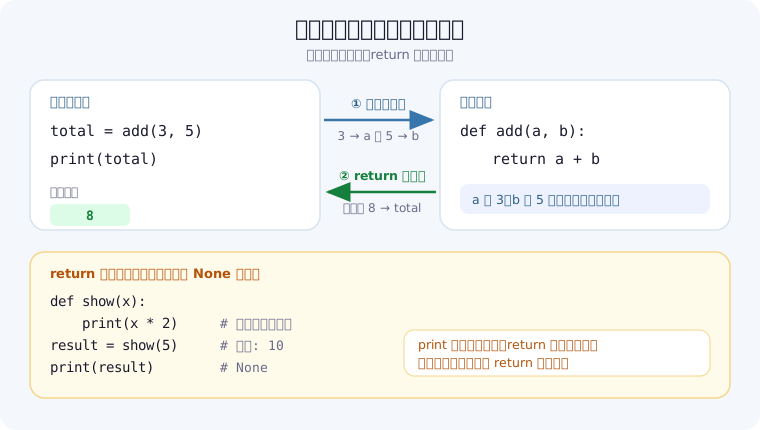
同じ処理を関数にまとめると何が変わるか
関数の価値は、コードが短くなることよりも「直す場所が1か所で済む」ことにあります。次の例は消費税込みの金額を求める処理です。関数にしておけば、税率が変わったときに修正するのは関数の中だけで、呼び出している場所は触らずに済みます。
prices = [980, 1500, 3200]

# 関数にする前:同じ計算式が呼び出しのたびに散らばる
for p in prices:
    print(round(p * 1.1))
# 1078
# 1650
# 3520

# 関数にした後:計算のルールが1か所にまとまる
def with_tax(price, rate=0.1):
    return round(price * (1 + rate))

print(with_tax(980), with_tax(1500), with_tax(3200))  # 1078 1650 3520
print(with_tax(980, 0.08))                            # 1058
後半のように税率を rate という引数にしておくと、通常は 10% で計算しつつ、軽減税率のときだけ 8% を指定する、といった使い分けができます。この「省略できる引数」がデフォルト引数で、2章で詳しく扱います。
docstring で関数の使い方を残す
関数の先頭に置いた三重引用符の文字列は docstring と呼ばれ、help() やエディタのホバー表示から読み出せます。半年後の自分が引数の意味を思い出すための、いちばん手軽な手段です。
def add(a, b):
    """
    2つの数値を加算して返す。

    Args:
        a: 1つ目の数値
        b: 2つ目の数値

    Returns:
        a と b の合計
    """
    return a + b

print(add(3, 5))        # 8
print(add.__doc__)      # docstringを表示
help(add)               # ヘルプを表示
合計・最大値・並べ替え・型変換といったよくある処理は、def を書かなくても Python に最初から用意されています。これが組み込み関数(built-in functions)です。5章の組み込み関数一覧に全71個を用途別でまとめたので、書き始める前に一度眺めておくと、車輪の再発明を避けられます。
2. 引数の種類
引数は、関数に外から値を渡すための入口です。def の括弧の中に書く名前を仮引数、呼び出すときに実際に渡す値を実引数と呼びます。Pythonの引数は「渡し方」と「受け取り方」の組み合わせで6種類あり、区切りの記号 / を含めると def の括弧の中は7つのパーツに分かれます。しかも書ける順番が決まっています。
なお、公式ドキュメントの用語集では仮引数(parameter)は5種類(位置またはキーワード・位置専用・キーワード専用・可変長位置・可変長キーワード)で、デフォルト値は種類ではなく付け方の違いです。この記事では書き方の違いとして、デフォルト引数も1つに数えて6種類としています。まず全体像を1枚で押さえてから、1つずつ動かして確認していきましょう。
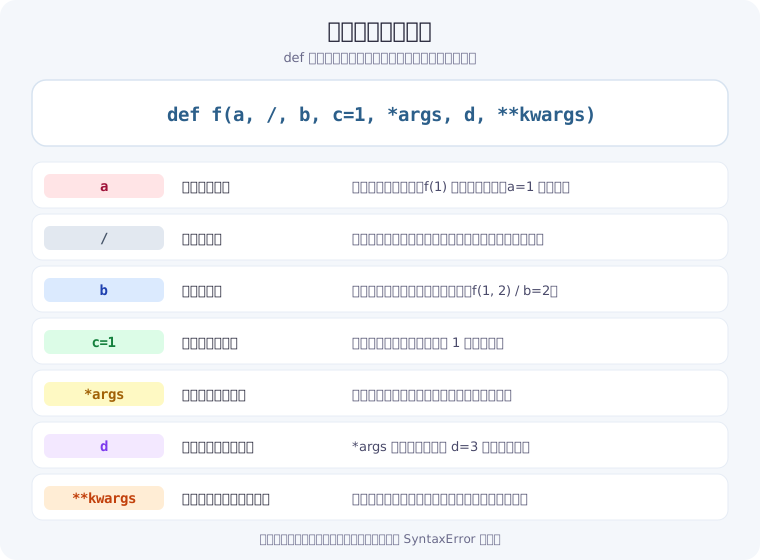
位置引数・キーワード引数
いちばん基本の渡し方が位置引数で、書いた順番どおりに値が入ります。名前を指定して渡すのがキーワード引数で、順番を気にせず書けるうえ、呼び出し側のコードだけを見て「どの値が何を意味するのか」がわかります。引数が3つ以上ある関数では、キーワード引数で渡したほうが読み間違いが減ります。
def profile(name, age, city):
    print(f"{name}, {age}歳, {city}在住")

# 位置引数(順番通りに渡す)
profile("Alice", 25, "Tokyo")      # Alice, 25歳, Tokyo在住

# キーワード引数(名前で渡す。順番は自由)
profile(age=30, city="Osaka", name="Bob")   # Bob, 30歳, Osaka在住

# 混在させるときは、位置引数を先に書く
profile("Carol", city="Kyoto", age=28)      # Carol, 28歳, Kyoto在住

# キーワード引数の後ろに位置引数は書けない
# profile(name="Alice", 25, "Tokyo")
# → SyntaxError: positional argument follows keyword argument
混在させるときのルールは1つだけで、位置引数はキーワード引数より前に書きます。逆にすると実行前の構文チェックで SyntaxError になります。また profile("Alice", name="Bob", ...) のように同じ引数を位置とキーワードで二重に渡すと、TypeError: profile() got multiple values for argument 'name' が出ます。
デフォルト引数(省略できる引数)
仮引数に = で値を書いておくと、その引数は省略できるようになります。「たいていはこの値でいい、たまに変えたい」という設定はデフォルト引数にしておくと、呼び出し側のコードが短く保てます。デフォルト値のある引数は、必ずない引数より後ろに書きます(def f(a=1, b) は SyntaxError)。
def greet(name, greeting="こんにちは"):
    print(f"{greeting}、{name}さん!")

greet("Alice")                    # こんにちは、Aliceさん!
greet("Bob", "おはよう")          # おはよう、Bobさん!
greet("Carol", greeting="やあ")   # やあ、Carolさん!

# 注意:デフォルト引数にミュータブルを使ってはいけない!
# 悪い例(バグの元)
def bad_append(item, lst=[]):
    lst.append(item)
    return lst

print(bad_append(1))   # [1]
print(bad_append(2))   # [1, 2] ← 前の呼び出しの状態が残る!

# 正しい書き方
def good_append(item, lst=None):
    if lst is None:
        lst = []
    lst.append(item)
    return lst
この落とし穴が起きるのは、デフォルト値が関数を定義したときに1度だけ作られるためです。lst=[] と書くと空のリストが1つだけ用意され、呼び出しのたびに同じリストが使い回されます。だから前回追加した要素が次の呼び出しにも残ってしまうわけです。リスト・辞書・集合のような後から中身を変えられる値をデフォルトにしたくなったら、None を既定にして関数の中で作り直す——これが定番の書き方です。
可変長引数(*args / **kwargs)
受け取る個数を決められないときは、*args と **kwargs を使います。*args は余った位置引数をタプルに、**kwargs は余ったキーワード引数を辞書にまとめてくれます。名前は慣習で、* と ** の記号のほうが本体です。呼び出し側で * や ** を付けると意味が反転し、リストや辞書を1つずつの引数に「ばらして」渡せます。
# *args - 任意個数の位置引数をタプルで受け取る
def sum_all(*args):
    return sum(args)

print(sum_all(1, 2, 3))        # 6
print(sum_all(1, 2, 3, 4, 5))  # 15

# **kwargs - 任意個数のキーワード引数を辞書で受け取る
def print_info(**kwargs):
    for key, value in kwargs.items():
        print(f"{key}: {value}")

print_info(name="Alice", age=25, city="Tokyo")

# 組み合わせ(順番は: 通常引数, *args, キーワードのみ, **kwargs)
def complex_func(required, *args, keyword_only=None, **kwargs):
    print(f"required: {required}")
    print(f"args: {args}")
    print(f"keyword_only: {keyword_only}")
    print(f"kwargs: {kwargs}")

complex_func("必須", 1, 2, 3, keyword_only="KW", extra="追加")
# required: 必須
# args: (1, 2, 3)
# keyword_only: KW
# kwargs: {'extra': '追加'}

# アンパックして渡す
numbers = [1, 2, 3]
print(sum_all(*numbers))    # 6(リストを位置引数にばらす)

params = {"name": "Alice", "age": 25}
print_info(**params)        # name: Alice / age: 25(辞書をキーワード引数にばらす)
キーワード専用引数(*)と位置専用引数(/)
引数の渡し方そのものを、関数を作る側から強制することもできます。* より後ろに書いた引数は必ず名前で渡すキーワード専用引数になり、/ より前に書いた引数は必ず位置で渡す位置専用引数になります。delete(path, force=True) のような真偽値フラグは、delete(path, True) と書かれると意味が読み取れません。キーワード専用にしておけば、呼び出し側が必ず名前を書くので、コードを読んだだけで挙動がわかります。
# * より後ろ = キーワード専用引数
def remove_file(path, *, force=False):
    print(path, force)

remove_file("data.csv", force=True)   # data.csv True

remove_file("data.csv", True)
# TypeError: remove_file() takes 1 positional argument but 2 were given

# / より前 = 位置専用引数(Python 3.8以降)
def pos_only(x, /, y):
    print(x, y)

pos_only(1, 2)      # 1 2
pos_only(1, y=2)    # 1 2

pos_only(x=1, y=2)
# TypeError: pos_only() got some positional-only arguments passed as keyword arguments: 'x'
位置専用引数は、標準ライブラリのように「引数名を後から変えても使う側を壊したくない」場面で効きます。自分のコードでは、まずキーワード専用引数(*)を使って読みやすさを上げるところから取り入れるのが実用的です。
引数まわりで出る TypeError の読み方
引数の数や名前を間違えたときのエラーメッセージは、原因ごとに文面が決まっています。次の3つを覚えておくと、メッセージを見た瞬間にどこを直せばよいか判断できます(Python 3.12 での実行結果)。
| エラーメッセージ | 原因 | 直し方 |
|---|---|---|
missing 1 required positional argument: 'b' | 引数が足りない | 呼び出し側に b の値を追加する |
takes 2 positional arguments but 3 were given | 引数が多すぎる | 余分な値を削るか、*args で受け取る |
got an unexpected keyword argument 'c' | その名前の引数がない | 綴りを確認する(def 側の名前と一致させる) |
メソッドを呼んだときに「引数が1つ多い」と言われる場合は、self の付け忘れなど別の原因が隠れていることもあります。エラー全般の読み方はPythonのよくあるエラーと解決法にまとめました。
リストや辞書を渡すときの注意
リスト・辞書・集合を渡して関数の中で中身を変更すると、呼び出し元の値も変わります。仕組みと見分け方は次の引数の渡し方を実測で確かめ、ここでは「書き換える関数」と「新しく作って返す関数」の書き方の違いだけを示します。
def add_item(basket, item):
    basket.append(item)      # 渡されたリストそのものを変更している
    return basket

my_basket = ["りんご"]
new_basket = add_item(my_basket, "みかん")

print(my_basket)             # ['りんご', 'みかん'] ← 呼び出し元も変わった
print(new_basket is my_basket)   # True(同じリスト)

# 元を変えたくないときは、新しいリストを作って返す
def add_item_safe(basket, item):
    return basket + [item]

my_basket2 = ["りんご"]
new2 = add_item_safe(my_basket2, "みかん")
print(my_basket2, new2)      # ['りんご'] ['りんご', 'みかん']
どちらが正解ということはなく、「この関数は受け取ったものを書き換えるのか、新しく作って返すのか」を決めて、関数名と docstring で伝えることが大切です。sort() と sorted()、reverse() と reversed() のように、標準の関数もこの2種類を名前で区別しています。
引数の渡し方を実測:値渡し?参照渡し?
結論から書くと、Python の引数は値のコピーでも変数そのものでもなく、オブジェクトへの参照を渡す仕組みです。公式FAQはこれを「実引数は代入にて渡される」と説明しています(Python公式FAQ「出力引数のある関数 (参照渡し) はどのように書きますか?」)。呼び出し元の値が変わるかどうかは、関数の中で「中身を変更したか」「名前を付け替えたか」で決まります。
Python 3.12.10(Windows 11)で実行し、コメントに実際の出力を書きました。id() が同じなら同じオブジェクトです。
def get_id(obj):
    return id(obj)

# ① 渡した直後は同じオブジェクト
num = 10
data = [1, 2]
print(get_id(num) == id(num))    # True
print(get_id(data) == id(data))  # True

# ② int に += 1 → n が別の int を指すだけ
def add_one(n):
    before = id(n)
    n += 1
    print(n, before == id(n))    # 11 False
    return n

add_one(num)
print(num)                       # 10(呼び出し元は変わらない)

# ③ リストの中身を変更 → 呼び出し元も変わる
def append_99(lst):
    lst.append(99)

append_99(data)
print(data)                      # [1, 2, 99]

# ④ 新しいリストを代入し直す → 呼び出し元は変わらない
def rebind_99(lst):
    lst = lst + [99]
    return lst

data2 = [1, 2]
result = rebind_99(data2)
print(data2, result)             # [1, 2] [1, 2, 99]
| 関数の中でしたこと | 呼び出し元の値 | 理由 |
|---|---|---|
| ① 受け取っただけ | 同じオブジェクト | 引数はコピーされない |
② int を受け取り n += 1 | 変わらない(10 のまま) | int は中身を変更できず、n が新しい int を指すだけ |
③ リストに append | 変わる([1, 2, 99]) | 同じリストの中身を変更した |
④ リストに lst = lst + [99] | 変わらない([1, 2]) | 名前 lst を新しいリストへ付け替えただけ |
lst.append(…) や lst[0] = … のように中身をいじる書き方は呼び出し元に響き、lst = … のように名前へ代入し直す書き方は響きません。紛らわしいのは += で、同じ条件で試すと、リストへの lst += [99] は呼び出し元も [1, 2, 99] に変え、文字列 'hi' への s += "!" は呼び出し元を変えませんでした。
呼び出し元を変えたくないときは、関数の最初で lst = list(lst) とコピーしてから変更します(この方法で append すると、呼び出し元は [1, 2] のまま、戻り値は [1, 2, 99] でした)。2章のデフォルト引数の落とし穴も、同じオブジェクトが使い回されることが原因です。
引数と戻り値に型を書く(型ヒント)
型ヒントは、引数や戻り値に想定する型をコードに書き込む記法です(「引数の型指定」と呼ばれることもあります)。引数名の後ろに : 型、括弧の後ろに -> 戻り値の型 を書きます。大事なのは、型ヒントを書いても実行時に型はチェックされないことです。公式ドキュメントの typing モジュールの解説にも「Python ランタイムは、関数や変数の型アノテーションを強制しません」と書かれています。
def double(n: int) -> int:
    return n * 2

print(double(5))              # 10
print(double("ab"))           # abab ← str を渡してもエラーにならない
print(double.__annotations__)
# {'n': <class 'int'>, 'return': <class 'int'>}

# デフォルト値と一緒に書く(: 型 = 既定値)
def fetch(user_id: int, retry: int = 3) -> str:
    return f"user={user_id}, retry={retry}"

print(fetch(7))               # user=7, retry=3

# list[str](3.9以降)・int | None(3.10以降)
def find_index(names: list[str], target: str) -> int | None:
    for i, name in enumerate(names):
        if name == target:
            return i
    return None

print(find_index(["Alice", "Bob"], "Bob"))    # 1
print(find_index(["Alice", "Bob"], "Carol"))  # None
n: int の関数に "ab" を渡してもエラーにならず、abab が返りました。書いた型は __annotations__ に記録されるだけです。
| 書き方 | 意味 | 補足 |
|---|---|---|
def f(n: int) | 引数 n に int を想定 | 基本の形 |
def f(n: int) -> int: | 戻り値に int を想定 | 行末のコロンの前に書く |
retry: int = 3 | 型とデフォルト値を一緒に書く | 型があるときは = の前後に空白を入れるのが PEP 8 の推奨 |
list[str] | 文字列のリスト | Python 3.9 以降の書き方(それより前は typing.List) |
int | None | int か None のどちらか | Python 3.10 以降の書き方(それより前は typing.Optional[int]) |
型の食い違いを見つけたいときは、mypy などの型チェッカやエディタの型チェック機能で実行前のコードを解析させます。実行時に確かめたい値(ユーザー入力など)は、isinstance() で型を調べて自分で例外を出します。設計面の利点は12.3で扱います。
3. 戻り値(return)
return は、関数の中で作った値を呼び出し元へ渡すための命令です。同時に関数はそこで終了し、return より後ろの行は実行されません。この2つの性質を押さえておくと、次の「早期リターン」のような書き方が自然に読めるようになります。
return と print の違い
初心者がいちばん詰まるのがこの違いです。print は画面に見せるだけで、呼び出し元には何も返しません。return は値を渡すので、変数に入れたり、別の計算に使ったりできます。return を書かない関数の戻り値は自動的に None になります。
def double_print(x):
    print(x * 2)          # 表示するだけ

def double_return(x):
    return x * 2          # 値を返す

a = double_print(5)       # 画面に 10 と表示される
print(a)                  # None ← 値は返ってきていない

b = double_return(5)      # 画面には何も出ない
print(b)                  # 10
print(double_return(5) + 1)   # 11(戻り値をそのまま計算に使える)

print(double_print(5) + 1)
# 10 と表示された直後にエラー
# TypeError: unsupported operand type(s) for +: 'NoneType' and 'int'
「関数の中では正しく表示されているのに、呼び出し側で None になる」という症状は、ほぼ return の書き忘れです。あとで値を使う予定があるなら return、その場で見せるだけなら print と決めておくと迷いません。
戻り値の基本パターン
# 単一の戻り値
def square(x):
    return x ** 2

result = square(5)   # 25

# 複数の戻り値(実際はタプルを返している)
def min_max(numbers):
    return min(numbers), max(numbers)

lo, hi = min_max([3, 1, 4, 1, 5, 9])
print(lo, hi)   # 1 9

# 条件によって異なる値を返す
def absolute(x):
    if x >= 0:
        return x
    return -x    # return があれば else は不要

# 戻り値なし(None を返す)
def print_greeting(name):
    print(f"Hello, {name}!")
    # return None が暗黙的に実行される

result = print_greeting("Alice")
print(result)  # None

# 早期リターン(ガード節)
def divide(a, b):
    if b == 0:
        return None    # 早期リターン
    return a / b

print(divide(10, 2))   # 5.0
print(divide(10, 0))   # None
早期リターンは、条件が満たされないケースを先に片付けてしまう書き方です。if のネストが浅くなり、「この関数が本当にやりたいこと」が下のほうにまとまるので、読み手が処理を追いやすくなります。
複数の値を返す3つの方法
Pythonの関数は複数の値をまとめて返せます。値が2〜3個ならタプル、意味を名前で示したいなら辞書、外部にも渡す本格的な戻り値なら dataclass、という選び分けが実用的です。次の例は同じ統計値を3通りの形で返しています。
# ① タプルで返す(そのまま複数の変数で受け取れる)
def stats(nums):
    return min(nums), max(nums), sum(nums) / len(nums)

lo, hi, avg = stats([3, 1, 4, 1, 5])
print(lo, hi, avg)                # 1 5 2.8
print(stats([3, 1, 4, 1, 5]))     # (1, 5, 2.8) ← 正体はタプル

# ② 辞書で返す(キーの名前で取り出せる)
def stats_dict(nums):
    return {"min": min(nums), "max": max(nums), "avg": sum(nums) / len(nums)}

print(stats_dict([3, 1, 4, 1, 5])["avg"])   # 2.8

# ③ dataclass で返す(属性でアクセスでき、型も書ける)
from dataclasses import dataclass

@dataclass
class Stats:
    min: int
    max: int
    avg: float

def stats_obj(nums):
    return Stats(min(nums), max(nums), sum(nums) / len(nums))

s = stats_obj([3, 1, 4, 1, 5])
print(s)        # Stats(min=1, max=5, avg=2.8)
print(s.avg)    # 2.8
タプルは手軽ですが、返す値が4つ5つと増えると result[3] が何なのか分からなくなります。受け取る側が番号を数え始めたら、辞書か dataclass に切り替える合図です。dataclass の書き方は11章でも扱っています。
4. スコープ(変数の有効範囲)
関数の中で作った変数は、その関数の中だけで生きています。この有効範囲がスコープで、Pythonは変数名を見つけるまでLocal → Enclosing → Global → Built-in の順に外へ探しに行きます(頭文字を取って LEGB ルールと呼ばれます)。いちばん外側の Built-in が、次章で扱う組み込み関数が置かれている場所です。print をどこからでも呼べるのは、この最後の階層に住んでいるからです。
| 探す順番 | どこの名前か | 例 |
|---|---|---|
| 1. Local | いま実行中の関数の中 | 関数内で代入した変数・仮引数 |
| 2. Enclosing | 1つ外側の関数の中 | 入れ子にした関数から見た外側の変数 |
| 3. Global | そのファイル(モジュール)の一番外側 | ファイル先頭で定義した変数・関数 |
| 4. Built-in | Pythonが最初から用意している名前 | print・len・sum などの組み込み関数 |
この順番を知っていると、list = [1, 2] のように組み込み関数と同じ名前の変数を作ったときに list() が使えなくなる理由も分かります。より内側の Global が先に見つかり、Built-in の list が隠れてしまうからです。
x = "global"   # グローバル変数

def outer():
    x = "enclosing"   # enclosing スコープ

    def inner():
        x = "local"   # ローカル変数
        print(x)      # local

    inner()
    print(x)          # enclosing

outer()
print(x)              # global

# global 宣言
count = 0

def increment():
    global count     # グローバル変数を変更する宣言
    count += 1

increment()
print(count)  # 1

# nonlocal 宣言(クロージャで使用)
def make_counter():
    count = 0
    def counter():
        nonlocal count   # 外側スコープの変数を変更
        count += 1
        return count
    return counter

c = make_counter()
print(c())  # 1
print(c())  # 2
print(c())  # 3
UnboundLocalError が出たときの読み方
スコープでいちばん多いつまずきが UnboundLocalError です。関数の中で一度でも代入している変数は、その関数のローカル変数として扱われます。そのため、外側にある同名の変数を「読んでから書く」つもりで count += 1 と書くと、まだ値の入っていないローカル変数を読もうとしてエラーになります。
count = 0

def bad_increment():
    count += 1     # count はローカル変数扱いになる

bad_increment()
# UnboundLocalError: cannot access local variable 'count'
#                    where it is not associated with a value

def good_increment():
    global count   # 外側の count を使うと宣言する
    count += 1

good_increment()
print(count)       # 1
上のメッセージは Python 3.12 で実行したときの表示です(バージョンによって文面が少し変わることがあります)。解決方法は global(または入れ子の関数なら nonlocal)の宣言ですが、その前に「引数で受け取って return で返す形にできないか」を検討するのがおすすめです。グローバル変数を書き換える関数が増えると、どこで値が変わったのかを追いにくくなります。
5. Python組み込み関数一覧(用途別・全71個)
組み込み関数は、import を書かずに最初から呼び出せる関数です。合計を出す sum、要素数を数える len、並べ替える sorted のように、日々のコードで頻繁に使うものがここに集まっています。自分で def を書き始める前に「同じことをする組み込み関数がないか」を確認すると、コードは短くなり、バグの入り込む余地も減ります。
公式ドキュメントの組み込み関数一覧には、内部用の __import__ を含めて71個が掲載されています(Python 3.14 のドキュメントを 2026年8月12日に確認)。個数はバージョンによって変わり、たとえば aiter と anext は Python 3.10 で追加されました。この章ではその71個すべてを用途別の8グループに分けて掲載し、そのうち日常的に使う機会が多いものは、後半で実行結果つきのコード例を添えています。
組み込み関数は import なしで使えます。一方 math.sqrt() や random.choice() は標準ライブラリの関数で、import math のように読み込んでから使います。どちらもPythonに同梱されていて追加インストールは不要です。標準ライブラリ側の全体像はPythonライブラリ一覧・使い方にまとめています。日付を扱う datetime も標準ライブラリで、書式の指定方法は日付フォーマット早見表で引けます。
用途別の早見表
「やりたいこと」から関数名を引けるように、8つのグループに分けました。例の欄には実際に実行した結果を載せています(Python 3.12 で確認)。
数値・計算に使う関数(7個)
| 関数 | 何をするか | 例(実行結果) |
|---|---|---|
abs() | 絶対値を返す | abs(-5) → 5 |
round() | 指定した小数位で丸める | round(3.14159, 2) → 3.14 |
sum() | 数値の合計を返す | sum([1, 2, 3]) → 6 |
min() | 最小値を返す | min([3, 1, 4]) → 1 |
max() | 最大値を返す | max([3, 1, 4]) → 4 |
divmod() | 商と余りを同時に返す | divmod(17, 5) → (3, 2) |
pow() | べき乗を計算する | pow(2, 10) → 1024 |
型を変換する・データ型を作る関数(12個)
| 関数 | 何をするか | 例(実行結果) |
|---|---|---|
int() | 整数に変換する | int("10") → 10 |
float() | 小数に変換する | float("3.5") → 3.5 |
complex() | 複素数を作る | complex(1, 2) → (1+2j) |
bool() | 真偽値に変換する | bool(0) → False |
str() | 文字列に変換する | str(10) → '10' |
list() | リストに変換する | list("abc") → ['a', 'b', 'c'] |
tuple() | タプルに変換する | tuple([1, 2]) → (1, 2) |
dict() | 辞書を作る | dict(a=1, b=2) → {'a': 1, 'b': 2} |
set() | 集合を作る(重複が消える) | set([1, 1, 2]) → {1, 2} |
frozenset() | 変更できない集合を作る | frozenset([1, 2]) → frozenset({1, 2}) |
bytes() | 変更できないバイト列を作る | bytes("あ", "utf-8") → b'\xe3\x81\x82' |
bytearray() | 変更できるバイト列を作る | bytearray(b"ab") → bytearray(b'ab') |
リストなどの並びを扱う関数(12個)
| 関数 | 何をするか | 例(実行結果) |
|---|---|---|
len() | 要素数・文字数を返す | len([1, 2, 3]) → 3 |
sorted() | 並べ替えた新しいリストを返す | sorted([3, 1, 2]) → [1, 2, 3] |
reversed() | 逆順に取り出す | list(reversed([1, 2, 3])) → [3, 2, 1] |
enumerate() | 連番を付けて取り出す | list(enumerate(["a", "b"])) → [(0, 'a'), (1, 'b')] |
zip() | 複数の並びを対応づける | list(zip([1, 2], ["a", "b"])) → [(1, 'a'), (2, 'b')] |
range() | 連続した整数の並びを作る | list(range(3)) → [0, 1, 2] |
all() | すべて真ならTrue | all([True, False]) → False |
any() | 1つでも真ならTrue | any([True, False]) → True |
filter() | 条件を満たす要素だけ残す(7章) | list(filter(lambda x: x > 1, [1, 2, 3])) → [2, 3] |
map() | 全要素に関数を適用する(7章) | list(map(str, [1, 2])) → ['1', '2'] |
iter() | イテレータを取り出す(10章) | next(iter([10, 20])) → 10 |
next() | 次の1件を取り出す(10章) | next(iter("ab")) → 'a' |
文字と文字列表現を扱う関数(8個)
| 関数 | 何をするか | 例(実行結果) |
|---|---|---|
chr() | 文字コードから文字を作る | chr(65) → 'A' |
ord() | 文字から文字コードを求める | ord("A") → 65 |
ascii() | 非ASCII文字をエスケープして表示 | ascii("あ") → '\u3042' |
repr() | デバッグ向けの文字列表現を返す | repr("a\nb") → 'a\nb' |
format() | 書式を指定して文字列にする | format(1234567, ",") → '1,234,567' |
hex() | 16進数の文字列にする | hex(255) → '0xff' |
oct() | 8進数の文字列にする | oct(8) → '0o10' |
bin() | 2進数の文字列にする | bin(5) → '0b101' |
入出力・コード実行の関数(7個)
| 関数 | 何をするか | 例 |
|---|---|---|
print() | 値を画面に出力する | print("Hi") → 画面に Hi |
input() | キーボード入力を文字列で受け取る | name = input("名前: ") |
open() | ファイルを開く | open("data.txt", encoding="utf-8") |
eval() | 式の文字列を評価して値を返す | eval("1 + 2") → 3 |
exec() | 文字列のコードを実行する | exec("x = 1") |
compile() | コードをコードオブジェクトに変換する | compile("1+1", "<s>", "eval") |
breakpoint() | その行でデバッガを起動する | breakpoint()(Python 3.7以降) |
オブジェクトと属性を調べる関数(12個)
| 関数 | 何をするか | 例(実行結果) |
|---|---|---|
type() | 型を調べる | type(1) → <class 'int'> |
isinstance() | その型かどうか判定する | isinstance(1, int) → True |
issubclass() | サブクラスかどうか判定する | issubclass(bool, int) → True |
id() | オブジェクトの識別値を返す | id(x) → 整数(実行のたびに変わる) |
dir() | 使える属性・メソッドを一覧する | dir(str) → メソッド名のリスト |
vars() | オブジェクトの属性を辞書で返す | vars(obj) → {'x': 1} |
hasattr() | その属性を持つか判定する | hasattr("a", "upper") → True |
getattr() | 属性を名前(文字列)で取り出す | getattr("abc", "upper")() → 'ABC' |
setattr() | 属性を名前で設定する | setattr(obj, "v", 3) |
delattr() | 属性を削除する | delattr(obj, "v") |
callable() | 呼び出せるオブジェクトか判定する | callable(print) → True |
hash() | ハッシュ値を返す | hash((1, 2)) == hash((1, 2)) → True |
クラス定義で使う関数(5個)
| 関数 | 何をするか | 例 |
|---|---|---|
object() | すべてのクラスの土台になる型 | class A(object):(3系では省略可) |
super() | 親クラスのメソッドを呼ぶ | super().__init__() |
property() | 属性のように呼べるメソッドにする | @property として使う |
classmethod() | クラス自身を受け取るメソッドにする | @classmethod(11章) |
staticmethod() | self を受け取らないメソッドにする | @staticmethod(11章) |
そのほかの関数(8個)
| 関数 | 何をするか | 例(実行結果) |
|---|---|---|
globals() | グローバル変数を辞書で返す | globals()["x"] |
locals() | その場のローカル変数を辞書で返す | locals() |
help() | ヘルプ(docstring)を表示する | help(print) |
memoryview() | バイト列をコピーせず参照する | bytes(memoryview(b"abc")[1:]) → b'bc' |
slice() | スライスを値として持ち回る | "abcdef"[slice(1, 4)] → 'bcd' |
aiter() | 非同期イテレータを取り出す | async for と組で使う(3.10以降) |
anext() | 非同期に次の1件を取り出す | await と組で使う(3.10以降) |
__import__() | import 文の内部実装 | 通常は import 文や importlib を使う |
ここまでで 7+12+12+8+7+12+5+8 = 71個、公式ドキュメントに掲載されている組み込み関数をすべて掲載しました。全部を覚える必要はまったくありません。「あ、こういう関数があったはず」と思い出せる状態になっていれば、あとは名前で検索すれば使い方にたどり着けます。
よく使う組み込み関数の実行例
ここからは、実際のコードで登場頻度が高いものを動かして確認します。出力はすべて実行して得られたものです。
集計する(len・sum・max・min・sorted・round)
scores = [72, 95, 63, 88, 95]

print(len(scores))                        # 5(件数)
print(sum(scores))                        # 413(合計)
print(round(sum(scores) / len(scores), 1))  # 82.6(平均を小数第1位まで)
print(max(scores), min(scores))           # 95 63
print(sorted(scores, reverse=True))       # [95, 95, 88, 72, 63]
print(abs(-3.5), divmod(17, 5), pow(2, 10))   # 3.5 (3, 2) 1024
平均を求めるだけなら、この5行で足ります。for ループで合計変数を回す必要はありません。「ループを書きたくなったら、まず組み込み関数で済まないか考える」のが短く安全なコードへの近道です。
並びを扱う(enumerate・zip・all・any・map・filter)
names = ["Alice", "Bob", "Carol"]
ages = [25, 30, 28]

# enumerate: 番号を振りながら取り出す(start=1 で1始まり)
for i, name in enumerate(names, start=1):
    print(i, name)
# 1 Alice
# 2 Bob
# 3 Carol

# zip: 2つのリストを対応づける
for name, age in zip(names, ages):
    print(f"{name}: {age}歳")
# Alice: 25歳
# Bob: 30歳
# Carol: 28歳

print(all(age >= 20 for age in ages))   # True(全員20歳以上)
print(any(age >= 30 for age in ages))   # True(1人でも30歳以上か)

print(list(map(len, names)))            # [5, 3, 5](各名前の文字数)
print(sorted(names, key=len))           # ['Bob', 'Alice', 'Carol'](文字数順)
print(list(reversed(names)))            # ['Carol', 'Bob', 'Alice']
enumerate を使うと i = 0 を用意して自分で足していく処理が消えます。zip は「名前のリスト」と「年齢のリスト」のように、対応する2つの並びを同時に回すときの定番です。どちらもインデックスのずれによるバグを構造的に防いでくれます。
型を変換する・調べる(int・str・bool・type・isinstance)
value = "42"                 # input() で受け取った値は必ず文字列

print(int(value) + 1)        # 43(数値に変換してから計算する)
print(type(value), type(int(value)))
# <class 'str'> <class 'int'>
print(isinstance(value, str))          # True
print(str(3.5) + "kg")                 # 3.5kg
print(bool(""), bool("a"), bool(0), bool([]))   # False True False False
print(float("3.5"), int(3.9))          # 3.5 3(int は小数点以下を切り捨て)
input() の戻り値は数字を入力しても文字列です。int() を忘れて計算しようとすると TypeError、数字でない文字列を int() に渡すと ValueError になります。どちらもよくあるエラー解決で扱っている典型例です。
辞書と組み合わせる(sorted・max・sum)
sales = {"Alice": 120, "Bob": 340, "Carol": 250}

# 売上の多い順に並べ替える
print(sorted(sales.items(), key=lambda kv: kv[1], reverse=True))
# [('Bob', 340), ('Carol', 250), ('Alice', 120)]

print(max(sales, key=sales.get))   # Bob(最も売上が多い人)
print(sum(sales.values()))         # 710(合計)
key は「何を基準に比べるか」を関数で指定する引数です。ここでは lambda を渡していますが、その書き方は6章、key のような「関数を受け取る関数」の考え方は7章で詳しく扱います。
組み込み関数でつまずきやすい5つのポイント
1. round は単純な四捨五入ではない
round は「ちょうど 0.5」のとき、偶数側に丸めます(銀行家の丸め)。金額計算などで厳密な四捨五入が必要なら、decimal モジュールを使います。
print(round(0.5), round(1.5), round(2.5), round(3.5))   # 0 2 2 4

from decimal import Decimal, ROUND_HALF_UP
print(Decimal("2.5").quantize(Decimal("1"), rounding=ROUND_HALF_UP))   # 3
2. map・filter・zip の結果は「1回しか読めない」
これらが返すのはリストではなくイテレータで、中身を取り出すと空になります。使い回したいときは list() でリストに固定します。
doubled = map(lambda x: x * 2, [1, 2, 3])

print(list(doubled))   # [2, 4, 6]
print(list(doubled))   # [] ← 2回目は空になる
3. sorted と sort は返すものが違う
sorted() は新しいリストを返し、list.sort() は元のリストを並べ替えて None を返します。nums = nums.sort() と書くと中身が None になるのは、この違いが原因です。
nums = [3, 1, 2]

print(nums.sort())     # None(元の nums が並べ替えられる)
print(nums)            # [1, 2, 3]

print(sorted([3, 1, 2]))   # [1, 2, 3](元のリストは変わらない)
4. 組み込み関数と同じ名前の変数を作らない
list・str・sum・id・type などを変数名にすると、その名前の組み込み関数が使えなくなります。4章のスコープで見たとおり、より内側で見つかった名前が優先されるためです。
list = [1, 2]          # 組み込みの list を隠してしまった

list("abc")
# TypeError: 'list' object is not callable
5. eval と exec を外部からの文字列に使わない
eval と exec は、渡された文字列をそのままPythonのコードとして実行します。ユーザー入力やネットワークから受け取った文字列を渡すと、任意のコードを実行される危険があります。数値に変換したいだけなら int() や float()、設定ファイルの読み込みなら json モジュールを使ってください。
6. lambda式(無名関数)
lambdaは名前のない小さな関数を1行で書く記法です。ソートのキー関数などシンプルな処理に使います。なお、次の例では構文を示すために square = lambda x: ... と変数へ代入していますが、関数に名前を付けるなら def を使うのが推奨です(PEP 8)。ここでは書き方を説明するための例で、実務では sorted の key のようにその場で渡す使い方が本命です。理由と使い分けは12.7で詳しく扱います。
# 基本構文: lambda 引数: 式
square = lambda x: x ** 2
print(square(5))   # 25

add = lambda a, b: a + b
print(add(3, 4))   # 7

# 条件式(三項演算子)を使う
classify = lambda x: "正" if x > 0 else "負" if x < 0 else "ゼロ"
print(classify(5))    # 正
print(classify(-3))   # 負
print(classify(0))    # ゼロ

# sorted のキー関数として使う
students = [("Alice", 85), ("Bob", 92), ("Carol", 78)]

# 点数でソート
sorted_by_score = sorted(students, key=lambda s: s[1], reverse=True)
print(sorted_by_score)  # [('Bob', 92), ('Alice', 85), ('Carol', 78)]

# 辞書のリストをソート
people = [
    {"name": "Alice", "age": 30},
    {"name": "Bob", "age": 25},
    {"name": "Carol", "age": 28}
]
sorted_by_age = sorted(people, key=lambda p: p["age"])

# 複数条件でソート(タプルを返す)
data = [("Alice", 30, "B"), ("Bob", 25, "A"), ("Carol", 30, "A")]
# 年齢昇順、その後グレード昇順
sorted_data = sorted(data, key=lambda x: (x[1], x[2]))
tkinter のボタンに引数付きの関数を渡す
tkinter のボタンの command= には、クリック時に呼ぶ関数を括弧なしで渡します。command=greet("Bob") と書くとボタン作成時に1回実行されるだけなので、引数付きで呼びたいときは lambda で包みます。
import tkinter as tk
from tkinter import ttk

def greet(name):
    print(f"こんにちは、{name}さん")

root = tk.Tk()

# ✅ lambda で包む → クリックのたびに実行される
ttk.Button(root, text="Alice", command=lambda: greet("Alice")).pack()

# ❌ 括弧付きで渡す → 作成時に1回実行されるだけ
ttk.Button(root, text="Bob", command=greet("Bob")).pack()

root.mainloop()
Python 3.12.10 でクリックを invoke() で再現すると、「こんにちは、Bobさん」は作成時に1回だけ表示され、Bob ボタンのクリックでは何も出ませんでした。ほかのウィジェットはtkinterウィジェット一覧へ。
7. 高階関数(map / filter / sorted / functools)
関数を引数に取ったり、関数を戻り値として返したりする関数を高階関数と呼びます。map / filter / sorted や functools(公式ドキュメント)と組み合わせると、ループを書かずに済む処理が増えます。ここで使う標準ライブラリの詳しい使い方はPython標準ライブラリの使い方も参照してください。
nums = [1, 2, 3, 4, 5, 6, 7, 8, 9, 10]

# map - 全要素に関数を適用
squares = list(map(lambda x: x**2, nums))
# [1, 4, 9, 16, 25, 36, 49, 64, 81, 100]

# filter - 条件を満たす要素だけ残す
evens = list(filter(lambda x: x % 2 == 0, nums))
# [2, 4, 6, 8, 10]

# 内包表記の方が Pythonic(推奨)
squares = [x**2 for x in nums]
evens = [x for x in nums if x % 2 == 0]

# functools.reduce - 要素を蓄積して1つの値に
from functools import reduce
product = reduce(lambda acc, x: acc * x, nums)  # 全要素の積
# 1*2*3*4*5*6*7*8*9*10 = 3628800

# functools.partial - 引数を部分的に固定した新しい関数を作る
from functools import partial

def power(base, exp):
    return base ** exp

square = partial(power, exp=2)
cube = partial(power, exp=3)
print(square(4))   # 16
print(cube(3))     # 27

# functools.lru_cache - キャッシュで再帰関数を高速化
from functools import lru_cache

@lru_cache(maxsize=None)
def fibonacci(n):
    if n < 2:
        return n
    return fibonacci(n-1) + fibonacci(n-2)

print(fibonacci(50))  # 12586269025(計算済みの値を再利用するので再計算しない)
8. クロージャ
クロージャは、外側のスコープの変数を「記憶」する内側の関数です。状態を持つ関数ファクトリーを作るのに使います。
# カウンターファクトリー
def make_counter(start=0, step=1):
    count = start
    def counter():
        nonlocal count
        current = count
        count += step
        return current
    return counter

c1 = make_counter()
c2 = make_counter(10, 2)

print(c1(), c1(), c1())    # 0 1 2
print(c2(), c2(), c2())    # 10 12 14

# 掛け算ファクトリー
def multiplier(factor):
    def multiply(x):
        return x * factor
    return multiply

double = multiplier(2)
triple = multiplier(3)
print(double(5))    # 10
print(triple(5))    # 15

# ロガーファクトリー
def make_logger(prefix):
    def log(message):
        print(f"[{prefix}] {message}")
    return log

info_log = make_logger("INFO")
error_log = make_logger("ERROR")

info_log("処理開始")     # [INFO] 処理開始
error_log("接続失敗")    # [ERROR] 接続失敗
9. デコレーター
デコレーターは関数を「ラップ」して機能を追加する仕組みです。@ 構文で使います。
import time
import functools

# シンプルなデコレーター(実行時間の計測)
def timer(func):
    @functools.wraps(func)   # 元の関数の情報を保持
    def wrapper(*args, **kwargs):
        start = time.time()
        result = func(*args, **kwargs)
        elapsed = time.time() - start
        print(f"{func.__name__} の実行時間: {elapsed:.4f}秒")
        return result
    return wrapper

@timer
def slow_function():
    time.sleep(0.5)
    return "完了"

slow_function()  # slow_function の実行時間: 0.5xxx秒

# 引数を持つデコレーター
def repeat(times):
    def decorator(func):
        @functools.wraps(func)
        def wrapper(*args, **kwargs):
            for _ in range(times):
                result = func(*args, **kwargs)
            return result
        return wrapper
    return decorator

@repeat(3)
def say_hello():
    print("Hello!")

say_hello()   # Hello! が3回出力

# ログデコレーター
def log_calls(func):
    @functools.wraps(func)
    def wrapper(*args, **kwargs):
        args_repr = [repr(a) for a in args]
        kwargs_repr = [f"{k}={v!r}" for k, v in kwargs.items()]
        signature = ", ".join(args_repr + kwargs_repr)
        print(f"呼び出し: {func.__name__}({signature})")
        result = func(*args, **kwargs)
        print(f"戻り値: {result!r}")
        return result
    return wrapper

@log_calls
def add(a, b):
    return a + b

add(3, 5)
# 呼び出し: add(3, 5)
# 戻り値: 8

# クラスベースのデコレーター
class Retry:
    def __init__(self, max_attempts=3):
        self.max_attempts = max_attempts

    def __call__(self, func):
        @functools.wraps(func)
        def wrapper(*args, **kwargs):
            for attempt in range(self.max_attempts):
                try:
                    return func(*args, **kwargs)
                except Exception as e:
                    print(f"試行 {attempt+1}/{self.max_attempts} 失敗: {e}")
            raise RuntimeError("最大試行回数を超えました")
        return wrapper

@Retry(max_attempts=3)
def flaky_function():
    import random
    if random.random() < 0.7:
        raise ValueError("ランダムエラー")
    return "成功"
10. ジェネレーター
ジェネレーターは値を一つずつ生成する特殊な関数です。大量のデータを扱う際にメモリを節約できます。
# yield を使ったジェネレーター関数
def count_up(start, stop):
    current = start
    while current <= stop:
        yield current   # 値を返しつつ一時停止
        current += 1

gen = count_up(1, 5)
print(next(gen))  # 1
print(next(gen))  # 2
for n in count_up(1, 5):
    print(n)       # 1, 2, 3, 4, 5

# フィボナッチ数列ジェネレーター(無限)
def fibonacci():
    a, b = 0, 1
    while True:
        yield a
        a, b = b, a + b

fib = fibonacci()
print([next(fib) for _ in range(10)])
# [0, 1, 1, 2, 3, 5, 8, 13, 21, 34]

# ファイルを行ごとに読む(大容量ファイルに有効)
def read_large_file(filepath):
    with open(filepath, "r", encoding="utf-8") as f:
        for line in f:
            yield line.strip()

# yield from - 別のイテラブルに委譲
def chain(*iterables):
    for it in iterables:
        yield from it

for x in chain([1, 2], [3, 4], [5]):
    print(x)   # 1, 2, 3, 4, 5

# send() - 外部から値を送り込む
def accumulator():
    total = 0
    while True:
        value = yield total
        if value is None:
            break
        total += value

acc = accumulator()
next(acc)          # 最初のyieldまで進める
print(acc.send(10))   # 10
print(acc.send(20))   # 30
print(acc.send(30))   # 60
再帰関数
関数が自分自身を呼び出すことを再帰(recursion)と呼びます。階乗の計算のように「同じ処理を一段小さくして繰り返す」問題を、素直に表現できます。
# 階乗 n! を再帰で計算する
def factorial(n):
    if n == 0:            # 基底条件(これ以上は再帰しない)
        return 1
    return n * factorial(n - 1)

print(factorial(5))   # 120  (= 5 * 4 * 3 * 2 * 1)
再帰でまず守るべきなのは、「基底条件(それ以上再帰しない条件)」を先に書くことです。基底条件を忘れると関数が止まらず、Python では既定で約1000回の呼び出し深さに達した時点で RecursionError が発生します。深い再帰が必要なときは sys.setrecursionlimit() で上限を調整するか、ループへの書き換えを検討します。処理を高速化したい場合は、第7章で紹介した functools.lru_cache で計算結果をキャッシュする方法も有効です。
11. クラスと特殊メソッド(概要)
クラスはデータ(属性)と処理(メソッド)をまとめたものです。関数と深く関わる重要な概念です。
class Circle:
    """円を表すクラス"""
    pi = 3.14159   # クラス変数

    def __init__(self, radius):   # コンストラクタ
        self.radius = radius      # インスタンス変数

    def area(self):               # インスタンスメソッド
        return Circle.pi * self.radius ** 2

    def perimeter(self):
        return 2 * Circle.pi * self.radius

    @classmethod
    def from_diameter(cls, diameter):  # クラスメソッド
        return cls(diameter / 2)

    @staticmethod
    def is_valid_radius(r):        # スタティックメソッド
        return r > 0

    def __str__(self):             # str() 変換
        return f"Circle(r={self.radius})"

    def __repr__(self):            # repr() 変換
        return f"Circle({self.radius!r})"

    def __eq__(self, other):       # == 比較
        return self.radius == other.radius

    def __lt__(self, other):       # < 比較
        return self.radius < other.radius

# 使用例
c = Circle(5)
print(c.area())         # 78.53975
print(c.perimeter())    # 31.4159
print(str(c))           # Circle(r=5)
c2 = Circle.from_diameter(10)
print(c == c2)          # True

# データクラス(Python 3.7+)
from dataclasses import dataclass, field

@dataclass
class Point:
    x: float
    y: float
    z: float = 0.0   # デフォルト値

    def distance_from_origin(self):
        return (self.x**2 + self.y**2 + self.z**2) ** 0.5

p = Point(3.0, 4.0)
print(p)                         # Point(x=3.0, y=4.0, z=0.0)
print(p.distance_from_origin())  # 5.0
12. 関数設計の鉄則・実践ヒント
関数の文法を覚えた後は、「どう設計するか」が次の壁になります。読みやすく、再利用しやすく、テストしやすい関数の書き方には共通の原則があります。ここでは、実務で関数を書くときに意識するとコードの質が一段上がる指針をまとめます。
12.1 単一責任の原則 — 関数は「1つのこと」だけする
1つの関数が複数のことをやろうとすると、名前を付けにくく、テストしにくく、再利用しにくくなります。関数名に「と(and)」が入りそうになったら、分割の合図です。
# ❌ 複数のことをやっている
def fetch_and_save_user(user_id, filename):
    user = fetch_user(user_id)         # 取得
    user["fetched_at"] = now()         # 加工
    with open(filename, "w") as f:     # 保存
        json.dump(user, f)
    return user

# ✅ 役割ごとに分ける
def fetch_user(user_id):
    return api_call(f"/users/{user_id}")

def add_timestamp(user):
    return {**user, "fetched_at": now()}

def save_to_file(data, filename):
    with open(filename, "w") as f:
        json.dump(data, f)

# 呼び出し側で組み合わせる
save_to_file(add_timestamp(fetch_user(123)), "user.json")上は考え方を示す断片です(api_call や now は未定義)。練習するなら、Excel作業の自動化のコードを「読み込む」「集計する」「書き出す」の関数に分け直してみてください。
12.2 引数は3つまでが理想・5つを超えたら設計を見直す
引数が多い関数は、呼び出すときに引数の意味を覚えていられず、テストもしづらくなります。関連する引数をまとめてオブジェクト(dataclass や辞書)にするのが定石です。
# ❌ 引数が多すぎる
def send_email(to, subject, body, cc, bcc, attachments, smtp_host, smtp_port, user, password):
    ...

# ✅ 設定はオブジェクトに、メッセージは別に
from dataclasses import dataclass

@dataclass
class SMTPConfig:
    host: str
    port: int = 587
    user: str = ""
    password: str = ""

@dataclass
class Mail:
    to: str
    subject: str
    body: str
    cc: list = None
    bcc: list = None
    attachments: list = None

def send_email(mail: Mail, config: SMTPConfig):
    ...
12.3 型ヒント(Type Hints)を書く — 「動くドキュメント」になる
型ヒントは Python 3.5以降の正式な機能(PEP 484)です。設計の面での利点は、関数の入出力の約束をコードそのものに残せることで、エディタの補完が効くようになり、呼び出す側は中身を読まずに渡すべき値を判断できます。書き方の基本と「実行時には強制されない」ことの実測は型ヒントの章にまとめました。
# ❌ 型ヒントなし — 何を渡せばいいか、何が返るか不明
def get_user(user_id, retry=3):
    ...

# ✅ 型ヒントあり — 関数だけ見て意図が読み取れる
def get_user(user_id: int, retry: int = 3) -> dict | None:
    """ユーザー情報を取得。見つからなければ None を返す。"""
    ...
12.4 docstring で「使い方」を書く — help() で読める
関数の最初に書く三重引用符の文字列が docstring です。help(関数名) や IDE のホバー表示で参照され、関数の「使い方説明書」になります。可能なら引数・戻り値・例外・使用例まで書くと、半年後の自分が救われます。
def calculate_bmi(weight_kg: float, height_m: float) -> float:
    """BMI(Body Mass Index)を計算する。

    引数:
        weight_kg: 体重(キログラム)
        height_m: 身長(メートル)

    戻り値:
        BMI 値(小数1位まで)

    例外:
        ValueError: 身長が0以下のとき

    使用例:
        >>> calculate_bmi(60, 1.7)
        20.8
    """
    if height_m <= 0:
        raise ValueError("身長は0より大きい値を指定してください")
    return round(weight_kg / (height_m ** 2), 1)
12.5 デコレーターは「横断的関心事」に使う
ログ出力・実行時間計測・キャッシュ・認証チェックなど、複数の関数で同じ前処理/後処理を行いたいときがデコレーターの出番です。functools モジュールには実用的なデコレーターが揃っており、自作する前にまずチェックする習慣をつけましょう。
from functools import lru_cache, wraps
import time

# 結果をキャッシュ(同じ引数なら再計算しない)
@lru_cache(maxsize=128)
def fibonacci(n: int) -> int:
    if n < 2:
        return n
    return fibonacci(n - 1) + fibonacci(n - 2)

# 自作デコレーター: 実行時間を計測
def timed(func):
    @wraps(func)            # 元の関数名・docstring を保持
    def wrapper(*args, **kwargs):
        start = time.time()
        result = func(*args, **kwargs)
        elapsed = time.time() - start
        print(f"{func.__name__}: {elapsed:.3f}秒")
        return result
    return wrapper

@timed
def slow_task():
    time.sleep(1)
12.6 ジェネレーターは「巨大データの逐次処理」に強い
リストはすべての要素をメモリに保持しますが、ジェネレーターは必要なときに1つずつ値を生成します。1GBのログファイルや、終わりのない無限ストリームでも、メモリの使用量を抑えたまま処理できます。「全件をリストに溜める前に、1件ずつ処理できるか」を考える習慣が、効率的なコードへの近道です。
# ❌ 全行をメモリに読み込む(巨大ファイルでメモリ不足)
def read_errors(path):
    with open(path) as f:
        lines = f.readlines()                     # 全行メモリへ
    return [line for line in lines if "ERROR" in line]

# ✅ ジェネレーター: 1行ずつ処理しメモリ消費を一定に
def read_errors(path):
    with open(path) as f:
        for line in f:                            # 1行ずつ読む
            if "ERROR" in line:
                yield line.rstrip("\n")

# 呼び出し側でも1件ずつ処理できる
for err in read_errors("huge.log"):
    print(err)
12.7 lambda vs def の使い分け — 1行1用途なら lambda
lambda は「その場で1回だけ使う、1行で書ける関数」のためのものです。名前を付けたい・複数行になる・複雑な処理を含むなら def を使うのが基本ルールです。lambda に名前を付けて変数に代入するくらいなら、最初から def で書きましょう。実際、PEP 8 でも lambda 式を変数に直接代入する書き方は非推奨とされています。
# ✅ lambda の正しい使い方: sorted の key にその場で渡す
users = [{"name": "Bob", "age": 30}, {"name": "Alice", "age": 25}]
users.sort(key=lambda u: u["age"])

# ❌ lambda を変数に代入するのは PEP 8 で非推奨
square = lambda x: x ** 2          # こうするくらいなら
def square(x):                     # def の方が読みやすい
return x ** 2関数設計のセンスは、書く量よりも「読んだ良いコードの量」に比例します。本サイトのサンプルアプリ179本では、ここで紹介した原則を踏まえた関数設計が多数登場します。気になるアプリを選んで、関数の分け方・命名・型ヒント・docstring を眺めるだけでも勉強になります。
関数でよくあるミスと直し方(早見表)
出会いやすい症状を、表示から引けるようにまとめました。メッセージは Python 3.12.10 で実際に出したものです(add・'b' などの名前は自分のコードに読み替えてください)。
| 症状(表示) | 原因 | 直し方 | 詳しく |
|---|---|---|---|
<function hello at 0x...> と表示される | 呼び出しの () を付け忘れた | print(hello()) のように括弧まで書く | 1章 |
関数の戻り値が None になる | return を書いていない(print しているだけ) | 値を返す行に return を書く | 3章 |
TypeError: unsupported operand type(s) for +: 'NoneType' and 'int' | None を返す関数の戻り値を計算に使った | 関数に return を書く | 3章・TypeErrorの解説 |
TypeError: add() takes 2 positional arguments but 3 were given | 引数が多すぎる | 渡す数を定義に合わせるか、*args で受け取る | 2章 |
TypeError: add() missing 1 required positional argument: 'b' | 引数が足りない | 値を追加するか、デフォルト値を付ける | 2章 |
TypeError: Dog.bark() takes 0 positional arguments but 1 was given | メソッドの定義に self がない | def bark(self): と書く | 11章 |
呼ぶたびに前回の値が残る([1] → [1, 2]) | デフォルト引数に [] を使った | 既定値を None にして関数内で作る | 2章 |
UnboundLocalError: cannot access local variable 'count' where it is not associated with a value | 関数内で外の変数に代入した | 引数で受け取って return で返す(または global) | 4章 |
IndentationError: expected an indented block after function definition on line 1 | 関数の中身を字下げしていない | def の次の行から半角スペース4個で字下げする | 1章 |
SyntaxError: expected ':' | def の行末のコロンを忘れた | def hello(): と書く | 1章 |
NameError: name 'greet' is not defined | 定義より前の行で呼び出した | def を呼び出しより上に書く | 1章 |
1行目の括弧の付け忘れは、エラーにならないぶん気づきにくいミスです。
def hello():
    return "こんにちは"

print(hello)      # <function hello at 0x0000024BFA44A480>(0x以降は実行のたびに変わる)
print(hello())    # こんにちは
逆に sorted の key や tkinter の command のように関数そのものを渡すときは括弧を付けません(6章)。括弧は「今ここで実行する」ときだけ付けます。
13. よくある質問(FAQ)
Q. 関数とメソッドの違いは何ですか?
単独で呼び出せるのが関数、オブジェクトに属していて「オブジェクト.名前()」の形で呼び出すのがメソッドです。len(s) は関数、s.upper() は文字列オブジェクトのメソッドにあたります。作り方はどちらも def で、クラスの中に書いた def がメソッドになります。使う側から見た違いは呼び出しの形だけと考えて差し支えありません。
Q. Pythonの組み込み関数はいくつありますか?
Python 3.14時点の公式ドキュメント「組み込み関数」の一覧表には、内部用の __import__ を含めて71個が掲載されています(2026年8月12日に確認)。個数はバージョンによって変わり、たとえば aiter と anext はPython 3.10で追加されました。日常的に使うのはそのうちの一部なので、まずはよく使うものを覚え、残りは一覧で存在を知っておく使い方で十分です。
Q. 引数の * と ** はどういう意味ですか?
def の側では受け取り方の指定で、*args は余った位置引数をタプルに、**kwargs は余ったキーワード引数を辞書にまとめて受け取ります。呼び出し側で書くと逆に展開の意味になり、f(*[1, 2]) はリストの要素を位置引数として、f(**{'a': 1}) は辞書をキーワード引数として渡します。定義側は集める、呼び出し側はばらす、と覚えると混乱しにくくなります。
Q. デフォルト引数に空のリストを指定してはいけないのはなぜですか?
デフォルト値は関数を定義したときに一度だけ作られ、同じオブジェクトが呼び出しのたびに使い回されるためです。def f(lst=[]) と書くと、前回の呼び出しで追加した要素が次の呼び出しにも残ります。既定値を None にして、関数の中で None なら新しいリストを作る書き方が定番の回避策です。
Q. lambdaはいつ使えばいいですか?
sorted や max の key のように、その場で一度だけ使う短い処理を渡すときに向いています。複数行になる場合、名前を付けたい場合、同じ処理を何度も使う場合は def で定義したほうが読みやすくなります。PEP 8 でも lambda 式を変数に直接代入する書き方は推奨されていません。
Q. return と print の違いは何ですか?
print は値を画面に表示するだけで、呼び出し元には何も返しません。return は値を呼び出し元に渡すので、変数に入れたり別の計算に使ったりできます。return を書かない関数の戻り値は None になり、None をそのまま計算に使うと TypeError になります。見せたいなら print、後で使いたいなら return と使い分けます。
Q. 関数の中から外の変数を書き換えるにはどうすればいいですか?
グローバル変数なら関数の先頭で global 変数名、外側の関数の変数なら nonlocal 変数名と宣言します。宣言せずに代入すると、その変数は関数内のローカル変数として扱われ、代入より前に参照した時点で UnboundLocalError になります。ただし global の多用は影響範囲を追いにくくするため、引数で受け取って return で返す形に置き換えられないかを先に検討することをおすすめします。
Q. 関数はどれくらいの大きさに分けるべきですか?
明確な行数の基準はありませんが、関数名に「〜と〜をする」と書きたくなったら分割の合図です。1つの関数が1つのことだけを担当していれば、名前を短く付けられ、テストも書きやすくなります。画面に収まらない長さになってきたら、処理のまとまりごとに切り出せないか見直してみてください。
本ページは、生成AIを活用して下書きし、運営者が内容を確認・編集したうえで公開しています。AIの利用方針は免責事項をご覧ください。
関数設計やPythonらしい書き方を突き詰めたい方には、ベストプラクティス125項目をまとめたEffective Python 第3版(当サイトのおすすめ本ランキング総合4位)が定番です。